

Custody Starter Architecture
Custody Starter Architecture Overview
Overview
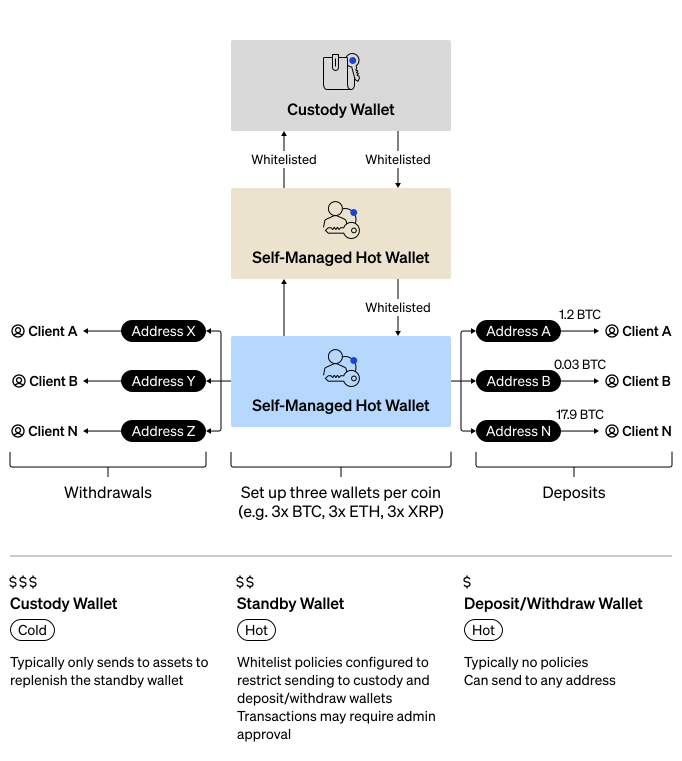
Custody starter architecture is the recommended integration pattern for individual enterprises that want to maximize security while maintaining operational flexibility. This architecture uses a three-wallet structure per coin that balances security requirements with day-to-day operational needs. If your use cases requires multiple enterprises, see Crypto-as-a-Service (CaaS).
This guide walks you through setting up the following:
- Custody wallet - A qualified custody cold wallet where you keep majority of your assets. This wallet has the strictest security protocols that govern the movement of assets between it and the standby wallet.
- Standby wallet - A self-custody wallet for intermediate funds. This wallet contains a smaller balance than your custody wallet and has less strict policies to enable more flexibility.
- Deposit/withdraw wallet - A second self-custody wallet for daily operations. This wallet contains the smallest balance of the three wallets and it has the most freedom and flexibility, enabling small withdraws without approvals.
- Whitelists - The policies that govern the movement of assets between the three wallets.
- Receive Addresses - Unique receive address on the deposit/withdraw wallet for everyone in your enterprise.
You can download the Postman Collection and import it into Postman to quickly explore and test the APIs.
Wallet Roles
| Wallet | Type | Balance | Policies | Purpose |
|---|---|---|---|---|
| Custody Wallet | Custody cold | Majority of assets | Strictest: admin approvals, velocity limits, whitelist | Long-term secure storage. |
| Standby Wallet | Self-Custody | Intermediate amount | Admin approval for withdrawals, whitelist | Buffer between cold storage and operations. |
| Deposit/Withdraw Wallet | Self-Custody | Smallest amount | None | Day-to-day customer transactions. |
Fund Flow
- Deposits: Wallets outside of your enterprise can deposit into the deposit/withdraw wallet.
- Accumulation: Periodically move accumulated assets from the deposit/withdraw wallet to the standby wallet.
- Cold Storage: Move excess funds from the standby wallet to the custody wallet for more secure storage.
- Withdrawals: People in your enterprise can withdrawal to wallets outside of your enterprise using the deposit/withdraw wallet.
- Replenishment: When the deposit/withdraw wallet runs low, replenish from the standby wallet.
- Major Replenishment: When the standby wallet runs low, replenish from the custody wallet.
Security Benefits
- Limited Exposure: Only a small portion of assets are in the most accessible wallet.
- Layered Security: Multiple approval checkpoints before accessing cold storage.
- Whitelist Restrictions: Funds can only move between designated wallets.
- Audit Trail: All fund movements require explicit authorization.
Policy Recommendations
| Wallet | Recommended Policies |
|---|---|
| Custody Wallet | Require multiple admin approvals, velocity limits (e.g., max withdrawal per day), whitelist to standby wallet only. |
| Standby Wallet | May require admin approval for withdrawals, whitelist to custody and deposit/withdraw wallets only. |
| Deposit/Withdraw Wallet | No policies (or minimal), allows spenders to withdraw freely for daily operations. |
Prerequisites
- Get Started
- Understand BitGo Wallet Types
Steps
Set up your custody starter architecture by following these guides:
- Set Up Custody Wallet - Set up your cold storage wallet.
- Set Up Standby Wallet - Set up your intermediate hot wallet.
- Create Whitelists - Configure whitelist policies between wallets.
- Set Up Deposit/Withdraw Wallet - Set up your operational hot wallet.
- Create Receive Addresses - Create addresses for individuals in your enterprise.