

Crypto-as-a-Service
Trade
Overview
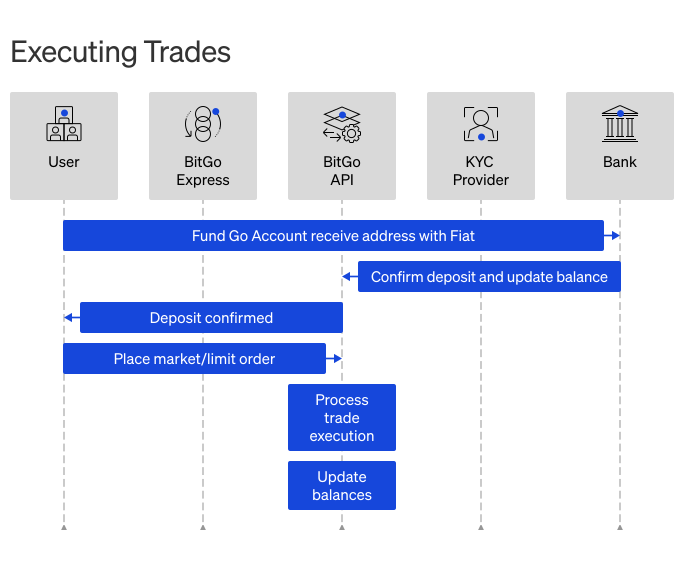
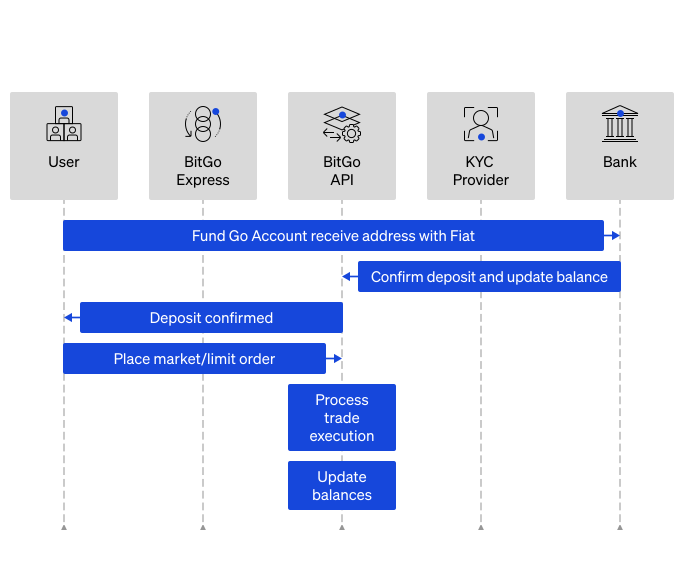
BitGo enables secure digital asset trading directly from a Go Account. Your end users can trade with BitGo as their sole counterparty, so assets never leave BitGo custody. BitGo automatically settles trades off-chain on weekdays at 12:00 PM Eastern Standard Time (EST).
Once your end users deposit assets into their Go Account, they can place the following order types:
- Market - An immediate order at the current market value.
- Limit - A pending order at a value you specify. The order executes only if the market value reaches the specified price during the specified duration.
- Stop - A conditional order that executes when the market reaches a specified trigger price. See Place Trade Orders for details on stop market and stop limit variants.
- Time-weighted average price (TWAP) - Regular - An order that executes over a specified period of time for the average price. You can set bounds to control how strictly the order strategy stays in line with the target fill progression:
- Narrow - within 3% or 3 minutes
- Standard - within 5% or 5 minutes
- Wide - within 7.5% or 10 minutes
- Time-weighted average price (TWAP) - Time Slice - An order strategy that breaks your order into fixed slices that execute for a duration you choose. Orders execute one at a time at equal intervals for the duration of the order.
- Steady Pace - An order strategy that breaks your order into fixed slices that execute one at a time at user defined intervals, with optional variance parameters for order size.
Because trading occurs from a Go Account, trades can include multiple assets. For example, if your end user funds a Go Account with $20,000 USD and places market orders for $7,000 in BTC and $3,000 in ETH, the wallet settles with:
- $10,000 USD
- $7,000 of BTC
- $3,000 of ETH
All trades require a signed payload that authorizes moving assets from your end users' Go Account to the counterparty. BitGo reserves the assets until the order completes. Trades follow enterprise and wallet policies and require all necessary signatures and approvals.
To receive real-time order and market updates, integrate the Trade WebSocket API. Trading is subject to a rate limit of 10 requests per second. To request an increase, contact support@bitgo.com.
Prerequisites
- Get Started
- Access token must have the
trade_tradescope.
- Access token must have the
- Create Wallets
- Deposit Assets or Fund Go Accounts
- Enterprise user with the Trade role.
Cookbook
Need just the steps? Expand a cookbook below to get started:
TradeOpen Cookbook1. List Trading Pairs (Optional)
View the trading pairs available for a Go Account before depositing assets. Depositing an unsupported asset may make it unrecoverable.
Endpoint: List Products
export BITGO_EXPRESS_HOST="<YOUR_LOCAL_HOST>"
export ACCOUNT_ID="<YOUR_GO_ACCOUNT_WALLET_ID>"
export ACCESS_TOKEN="<SERVICE_USER_ACCESS_TOKEN>"

curl -X GET \
  "https://app.bitgo-test.com/api/prime/trading/v1/accounts/$ACCOUNT_ID/products" \
  -H 'Content-Type: application/json' \
  -H "Authorization: Bearer $ACCESS_TOKEN"
Step Result
{
  "data": [
    {
      "id": "0d75f716-680b-11eb-a7a5-0a34d7f8426c",
      "name": "TTRUMP-TUSD",
      "baseCurrencyId": "8a93fece-6878-4b27-88eb-a83a40af0318",
      "baseCurrency": "TTRUMP",
      "quoteCurrencyId": "e708df52-ba80-42cd-868c-5dab42fe6bac",
      "quoteCurrency": "TUSD",
      "baseMinSize": "",
      "baseMaxSize": "",
      "baseIncrement": "0.000001",
      "quoteMinSize": "10",
      "quoteIncrement": "0.01",
      "quoteDisplayPrecision": 4,
      "isTradeDisabled": false,
      "isMarginTradeSupported": true
    },
    {
      "id": "016a8ac2-b75a-11ed-84ea-0a52a0835891",
      "name": "TDOGE-TUSD*",
      "baseCurrencyId": "2f124c6c-d79c-4dc0-b57d-b8c60b408a37",
      "baseCurrency": "TDOGE",
      "quoteCurrencyId": "e708df52-ba80-42cd-868c-5dab42fe6bac",
      "quoteCurrency": "TUSD*",
      "baseMinSize": "",
      "baseMaxSize": "",
      "baseIncrement": "0.0001",
      "quoteMinSize": "10",
      "quoteIncrement": "0.01",
      "quoteDisplayPrecision": 2,
      "isTradeDisabled": false,
      "isMarginTradeSupported": true
    }
  ]
}
2. Place Trade Order
Place a market, limit, or TWAP order from the Go Account. For a full breakdown of order types, fill behavior, and trading intent, see Place Trade Orders guide.
Note
Testnet settlement is available for tsol:trump and test TUSD (tusd) in the US and EU regions only. Automatic settlement is capped at 100 tsol:trump per order. See Settle Trade for the settlement flow.
Endpoint: Place Order
export BITGO_EXPRESS_HOST="<YOUR_LOCAL_HOST>"
export ACCOUNT_ID="<YOUR_GO_ACCOUNT_WALLET_ID>"
export ACCESS_TOKEN="<SERVICE_USER_ACCESS_TOKEN>"
export TRADING_PAIR="<TRADING_PAIR>"
export QUANTITY_CURRENCY="<QUANTITY_CURRENCY>"

curl -X POST \
  "http://$BITGO_EXPRESS_HOST/api/prime/trading/v1/accounts/$ACCOUNT_ID/orders" \
  -H "Authorization: Bearer $ACCESS_TOKEN" \
  -H "Content-Type: application/json" \
  -d '{
    "clientOrderId": "myorder1",
    "type": "market",
    "product": "'"$TRADING_PAIR"'",
    "side": "buy",
    "quantity": "10000",
    "quantityCurrency": "'"$QUANTITY_CURRENCY"'"
  }'
export BITGO_EXPRESS_HOST="<YOUR_LOCAL_HOST>"
export ACCOUNT_ID="<YOUR_GO_ACCOUNT_WALLET_ID>"
export ACCESS_TOKEN="<SERVICE_USER_ACCESS_TOKEN>"
export TRADING_PAIR="<TRADING_PAIR>"
export QUANTITY_CURRENCY="<QUANTITY_CURRENCY>"

curl -X POST \
  "http://$BITGO_EXPRESS_HOST/api/prime/trading/v1/accounts/$ACCOUNT_ID/orders" \
  -H "Authorization: Bearer $ACCESS_TOKEN" \
  -H "Content-Type: application/json" \
  -d '{
    "clientOrderId": "myorder1",
    "type": "limit",
    "product": "'"$TRADING_PAIR"'",
    "side": "buy",
    "quantity": "1",
    "quantityCurrency": "'"$QUANTITY_CURRENCY"'",
    "limitPrice": "10005",
    "duration": 60
  }'
export BITGO_EXPRESS_HOST="<YOUR_LOCAL_HOST>"
export ACCOUNT_ID="<YOUR_GO_ACCOUNT_WALLET_ID>"
export ACCESS_TOKEN="<SERVICE_USER_ACCESS_TOKEN>"
export TRADING_PAIR="<TRADING_PAIR>"
export QUANTITY_CURRENCY="<QUANTITY_CURRENCY>"

curl -X POST \
  "http://$BITGO_EXPRESS_HOST/api/prime/trading/v1/accounts/$ACCOUNT_ID/orders" \
  -H "Authorization: Bearer $ACCESS_TOKEN" \
  -H "Content-Type: application/json" \
  -d '{
    "clientOrderId": "myorder1",
    "type": "twap",
    "product": "'"$TRADING_PAIR"'",
    "side": "buy",
    "quantity": "100000",
    "quantityCurrency": "'"$QUANTITY_CURRENCY"'",
    "duration": 60
  }'
export BITGO_EXPRESS_HOST="<YOUR_LOCAL_HOST>"
export ACCOUNT_ID="<YOUR_GO_ACCOUNT_WALLET_ID>"
export ACCESS_TOKEN="<SERVICE_USER_ACCESS_TOKEN>"
export TRADING_PAIR="<TRADING_PAIR>"
export QUANTITY_CURRENCY="<QUANTITY_CURRENCY>"

curl -X POST \
  "http://$BITGO_EXPRESS_HOST/api/prime/trading/v1/accounts/$ACCOUNT_ID/orders" \
  -H "Authorization: Bearer $ACCESS_TOKEN" \
  -H "Content-Type: application/json" \
  -d '{
    "clientOrderId": "myorder1",
    "type": "twap",
    "product": "'"$TRADING_PAIR"'",
    "side": "buy",
    "quantity": "100000",
    "quantityCurrency": "'"$QUANTITY_CURRENCY"'",
    "duration": 60,
    "isTimeSliced": true,
    "interval": 5
  }'
Step Result
{
  "id": "67fd640c-cb6c-4218-80ae-49e79ec15646",
  "accountId": "60e740e7898f7d00064d43769a73dc48",
  "clientOrderId": "myorderid1",
  "time": "2021-08-05T18:05:23.431Z",
  "creationDate": "2021-08-05T18:05:22.286Z",
  "scheduledDate": "2021-08-05T18:05:00.000Z",
  "lastFillDate": "2021-08-05T18:05:23.302Z",
  "completionDate": "2021-08-05T18:05:23.431Z",
  "settleDate": "2021-08-05T20:00:00.000Z",
  "fundingType": "funded",
  "type": "market",
  "status": "completed",
  "product": "TTRUMP-TUSD",
  "side": "buy",
  "quantity": "1000",
  "quantityCurrency": "TUSD",
  "filledQuantity": "0.02457152",
  "averagePrice": "40697.32"
}
Note
You can cancel an open trade order, but you can't update it. To edit an order, cancel it and place a new one. See Cancel Trade Orders.
3. Subscribe to Order Updates
Subscribe to the Trade WebSocket to view live order and market data updates. See View Live Order and Market Data Updates.
To receive notifications when trades complete, subscribe to an organization-level trade webhook. This is a one-time setup. Your webhook receives two signals per completed trade: one at trade execution and one when settlement completes. Act on the first signal where status is "completed" and no settleDate is present.
Note
If you capture a client spread on trades, the trade-execution signal is the trigger for fee capture; the settlement signal is informational only.
Endpoint: Add Organization Webhook
export ORGANIZATION_ID="<YOUR_ORGANIZATION_ID>"
export ACCESS_TOKEN="<SERVICE_USER_ACCESS_TOKEN>"
export URL="<YOUR_WEBHOOK_URL>"
export LABEL="<YOUR_WEBHOOK_NAME>"

curl -X POST \
  https://app.bitgo-test.com/api/v2/organization/$ORGANIZATION_ID/webhook \
  -H 'Content-Type: application/json' \
  -H "Authorization: Bearer $ACCESS_TOKEN" \
  -d '{
    "type": "tradeOrder",
    "url": "'"$URL"'",
    "label": "'"$LABEL"'"
  }'
4. Get Order Details
After receiving a trade completion webhook notification, retrieve the full order to get the fields you need: filledQuantity, filledQuoteQuantity, averagePrice, product, and side. If you capture a client spread, you calculate the fee from these fields. The webhook payload contains the accountId and order id. Track processed order identifiers to prevent duplicate processing from webhook retries.
Endpoint: Get Order
export ACCOUNT_ID="<YOUR_GO_ACCOUNT_WALLET_ID>"
export ORDER_ID="<ORDER_ID_FROM_WEBHOOK>"
export ACCESS_TOKEN="<SERVICE_USER_ACCESS_TOKEN>"

curl -X GET \
  "https://app.bitgo-test.com/api/prime/trading/v1/accounts/$ACCOUNT_ID/orders/$ORDER_ID" \
  -H 'Content-Type: application/json' \
  -H "Authorization: Bearer $ACCESS_TOKEN"
Step Result
{
  "id": "67fd640c-cb6c-4218-80ae-49e79ec15646",
  "accountId": "60e740e7898f7d00064d43769a73dc48",
  "clientOrderId": "myorderid1",
  "completionDate": "2021-08-05T18:05:23.431Z",
  "settleDate": "2021-08-05T20:00:00.000Z",
  "fundingType": "funded",
  "type": "market",
  "status": "completed",
  "product": "TTRUMP-TUSD",
  "side": "buy",
  "quantity": "1000",
  "quantityCurrency": "TUSD",
  "filledQuantity": "0.02457152",
  "filledQuoteQuantity": "1000",
  "averagePrice": "40697.32"
}
5. Settle Trade
Settle a completed trade by transferring part of the order balance from the trading Go Account to another Go Account. Settlement uses the same build-authenticate-send flow as any other Go Account transfer.
Note
In testnet, tsol:trump is the only asset you can settle.
5.1 Build Transaction
Build a transaction from the source Go Account to the destination Go Account. Pass the destination Go Account wallet ID as the value of the address field in the recipient object.
Capture the Client Spread Fee
If you charge a client spread, this transfer captures your fee. Send the fee from the end user's Go Account to your collection Go Account. This is an internal ledger movement (book transfer) with no on-chain transaction.
Tell your end users that you charge a fee on top of the trade execution price.
Start the fee transfer as soon as the trade completes. If you delay, the end user may withdraw funds before you capture the fee.
Calculate the fee based on the trade direction. feeBps is your fee rate in basis points:
- Buy (fiat to crypto):
fee = (filledQuoteQuantity * feeBps / 10000) / averagePrice. The fee uses the base token, such as BTC. SetCOINto the OFC base asset, such asofctbtc4. - Sell (crypto to fiat):
fee = filledQuoteQuantity * feeBps / 10000. The fee uses the quote token, such as USD. SetCOINto the OFC quote asset, such asofctusd.
Endpoint: Build a Transaction
export COIN="<ASSET_ID>"
export WALLET_ID="<SOURCE_GO_ACCOUNT_WALLET_ID>"
export ACCESS_TOKEN="<SERVICE_USER_ACCESS_TOKEN>"
export AMOUNT="<AMOUNT_IN_BASE_UNITS>"
export ADDRESS="<DESTINATION_GO_ACCOUNT_WALLET_ID>"

curl -X POST \
  https://app.bitgo-test.com/api/v2/$COIN/wallet/$WALLET_ID/tx/build \
  -H 'Content-Type: application/json' \
  -H "Authorization: Bearer $ACCESS_TOKEN" \
  -d '{
    "recipients": [
      {
        "amount": "'"$AMOUNT"'",
        "address": "'"$ADDRESS"'"
      }
    ]
}'
const transaction = await wallet.prebuildTransaction({
  recipients: [
    {
      amount: '<AMOUNT_IN_BASE_UNITS>',
      address: '<DESTINATION_GO_ACCOUNT_WALLET_ID>',
    },
  ],
});

console.dir(transaction);
Step Result
{
  "payload": "<PAYLOAD_FROM_BUILD_STEP>",
  "feeInfo": {
    "feeString": "0"
  },
  "coin": "ofc",
  "token": "ofctsol:trump"
}
5.2 Authenticate Transaction
Use the Go Account passphrase to authenticate the transaction. To keep the passphrase off the internet, use BitGo Express in external-signing mode or the JavaScript SDK.
export BITGO_EXPRESS_HOST="<YOUR_LOCAL_HOST>"
export ACCESS_TOKEN="<SERVICE_USER_ACCESS_TOKEN>"
export WALLET_ID="<SOURCE_GO_ACCOUNT_WALLET_ID>"
export WALLET_PASSPHRASE="<YOUR_GO_ACCOUNT_PASSPHRASE>"
export PAYLOAD="<PAYLOAD_FROM_BUILD_STEP>"

curl -X POST \
  http://$BITGO_EXPRESS_HOST/api/v2/ofc/signPayload \
  -H 'Content-Type: application/json' \
  -H "Authorization: Bearer $ACCESS_TOKEN" \
  -d '{
    "walletId": "'"$WALLET_ID"'",
    "walletPassphrase": "'"$WALLET_PASSPHRASE"'",
    "payload": "'"$PAYLOAD"'"
  }'
const wallet = await bitgo.coin('ofc').wallets().get({ id: goAccountId });

if (wallet === undefined) {
  throw new Error(`Could not find OFC wallet ${goAccountId}`);
}

const walletPassphrase = '<YOUR_GO_ACCOUNT_PASSPHRASE>';
const tradingAccount = wallet.toTradingAccount();
const stringifiedPayload = '<PAYLOAD_FROM_BUILD_STEP>';
const signature = await tradingAccount.signPayload({
  payload: stringifiedPayload,
  walletPassphrase,
});
Step Result
{
  "coin": "ofctsol:trump",
  "payload": "<PAYLOAD_FROM_BUILD_STEP>",
  "signature": "<SIGNATURE_FROM_AUTH_STEP>"
}
5.3 Send Transaction
Send the signed payload to BitGo. The halfSigned object takes the payload and signature returned by the previous step.
Note
If you capture a client spread, your collection Go Account receives the fee once this transfer confirms. Display only the net balance (post-fee) to end users and gate withdrawals until the transfer confirms to prevent a race condition.
Endpoint: Send Half-Signed Transaction
export COIN="<ASSET_ID>"
export WALLET_ID="<SOURCE_GO_ACCOUNT_WALLET_ID>"
export ACCESS_TOKEN="<SERVICE_USER_ACCESS_TOKEN>"
export PAYLOAD="<PAYLOAD_FROM_AUTH_STEP>"
export SIGNATURE="<SIGNATURE_FROM_AUTH_STEP>"

curl -X POST \
  https://app.bitgo-test.com/api/v2/$COIN/wallet/$WALLET_ID/tx/send \
  -H 'Content-Type: application/json' \
  -H "Authorization: Bearer $ACCESS_TOKEN" \
  -d '{
    "halfSigned": {
      "payload": "'"$PAYLOAD"'",
      "signature": "'"$SIGNATURE"'"
    }
  }'
// stringifiedPayload and signature come from Steps 5.1 and 5.2
const sendUrl = wallet.baseCoin.url('/wallet/' + wallet.id() + '/tx/send');
await bitgo
  .post(sendUrl)
  .send({ halfSigned: { payload: stringifiedPayload, signature } })
  .result();
Step Result
{
  "transfer": {
    "id": "65155c4a72fddb000774edbee5fa75fd",
    "coin": "ofctsol:trump",
    "wallet": "6a57cf1c41a5e2087587970efd1db9ef",
    "type": "send",
    "state": "signed"
  },
  "tx": {
    "transactionType": "BOOK_TRANSFER"
  },
  "status": "signed"
}
5.4 Approve Transaction (Optional)
If you configure an approval requirement for transfers, another admin must approve the transaction — you can't approve your own.
Endpoint: Update Pending Approval
export APPROVAL_ID="<APPROVAL_ID>"
export ACCESS_TOKEN="<SERVICE_USER_ACCESS_TOKEN>"
export OTP="<OTP>"

curl -X PUT \
  https://app.bitgo-test.com/api/v2/pendingApprovals/$APPROVAL_ID \
  -H 'Content-Type: application/json' \
  -H "Authorization: Bearer $ACCESS_TOKEN" \
  -d '{
    "state": "approved",
    "otp": "'"$OTP"'"
  }'
const baseCoin = bitgo.coin(initialPendingApproval.coin);
const pendingApproval = await baseCoin.pendingApprovals().get({ id: initialPendingApproval.id });
const result = await pendingApproval.approve(params);