

Stablecoins
Mint Stablecoins
Overview
Minting is a process that issues new stablecoin tokens in exchange for fiat currency. Each mint operation creates an equivalent amount of stablecoin backed by reserves, maintaining a 1:1 relationship between the circulating tokens and the underlying fiat assets.
To mint stablecoins, you must deposit fiat currency into your Go Account. Once BitGo confirms the deposit, BitGo mints an equivalent amount of stablecoins and issues them to your designated destination. You may mint to any wallet type provided you have previously whitelisted the address in your Go Account. Supported destinations include:
- Your Go Account
- Whitelisted Go Account
- Whitelisted BitGo wallet
- Whitelisted external wallet
All mint orders are subject to validation, authorization, and reconciliation controls to ensure that issued tokens remain fully backed by collateral and aligned with reserve balances.
Note
When transacting from Go Accounts, ensure ticker symbols use the ofc prefix, which denotes the tokenized asset is off chain. When transacting from bank accounts, ensure ticker symbols use the fiat prefix. To learn more, see Asset Ticker Symbols.
Prerequisites
Mint Order Lifecycle
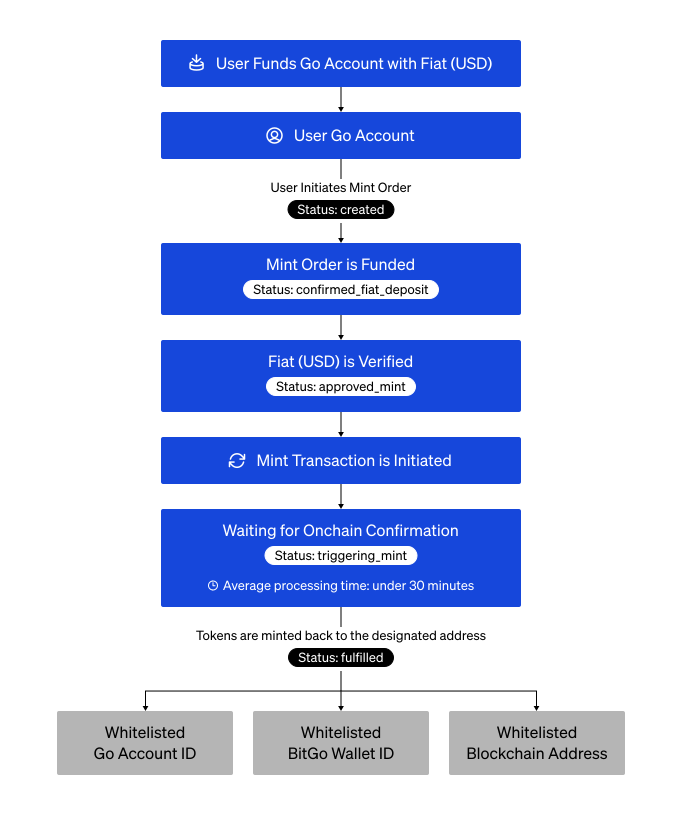
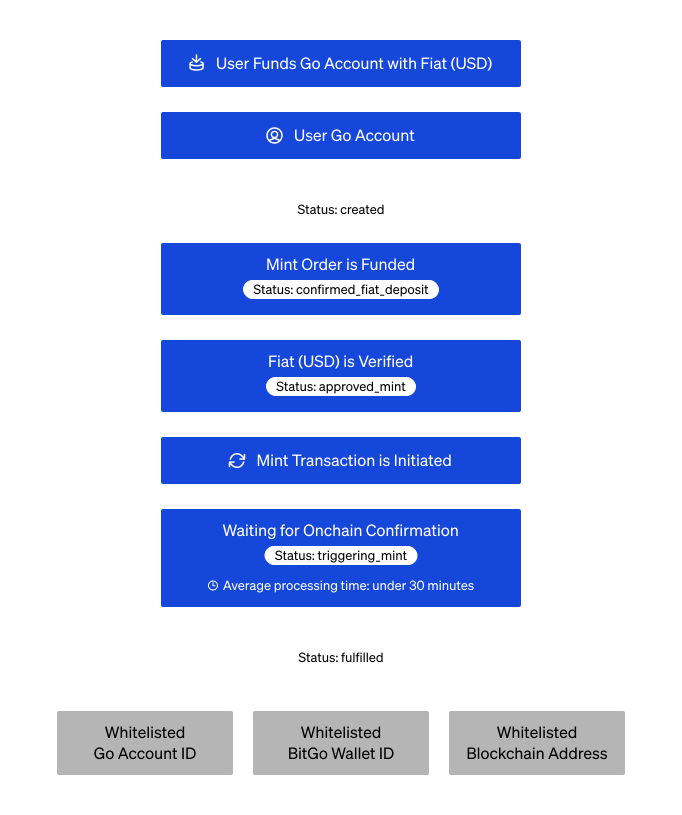
A mint order lifecycle tracks your request from the initial fiat deposit into your Go Account to the delivery of your stablecoins. The diagram below provides a high-level overview of the stages a mint order progresses through from initiation to final fulfillment.
Note
Your mint order requests go into processing and reach fulfilled status on average under 30 minutes. However, mint orders of high-value increase processing time.
Mint Status Lifecycle
| Status | Description |
|---|---|
created |
Initial state when you first submit a mint order. Waiting to fund mint order with fiat. |
confirmed_fiat_deposit |
BitGo successfully verifies the fiat deposit. |
approved_mint |
Mint order validated and approved for execution. |
triggering_mint |
Mint order is currently initiating the transaction on the blockchain. |
fulfilled |
Tokens successfully minted and delivered to the destination address. |
failed_mint_transaction |
An error occurred while attempting to start the minting process. |
failed_to_mint |
The blockchain transaction broadcast but failed or the network rejected it. |
Cookbook
Want the steps without the walkthrough? Expand the cookbook below:
Mint StablecoinsOpen Cookbook1. List Available Stablecoins
View a comprehensive list of all stablecoins available for minting.
The following example passes the testnet base URL and returns testnet asset IDs. To see production asset IDs, call the production base URL (https://app.bitgo.com).
Endpoint: List Supported Stablecoins
export ACCESS_TOKEN="<YOUR_ACCESS_TOKEN>"

curl -X GET \
  https://app.bitgo-test.com/api/stablecoin/v1/assets \
  -H 'Content-Type: application/json' \
  -H "Authorization: Bearer $ACCESS_TOKEN"
import * as BitGoJS from 'bitgo';
import { common } from '@bitgo/sdk-core';
require('dotenv').config({ path: '../../../.env' });

// Configuration
const accessToken = '';
const enterpriseId = '';
const walletId = '';
const walletPassphrase = '';

const bitgo = new BitGoJS.BitGo({ env: 'test' });
bitgo.authenticateWithAccessToken({ accessToken });

const baseUrl = common.Environments[bitgo.getEnv()].uri + '/api/stablecoin/v1';

async function main() {
  // Step 1: Fetch assets to get IDs and treasury wallet
  const assets = (await bitgo.get(`${baseUrl}/assets`)).body;
  const usdAsset = assets.find((a: any) => a.token === 'tfiatusd');
  const stablecoinAsset = assets.find((a: any) => a.token === 'tbsc:usd1');

  const treasuryWalletId = stablecoinAsset.treasuryAccountWalletId;
Step Result
[
  {
    "id": "08c1271e-b15d-4af8-8929-f75383903da4",
    "token": "tfiatusd",
    "name": "Testnet US Dollar",
    "decimals": 2,
  },
  {
    "id": "bfd0daec-f849-4b96-bdb6-6373bffeb9b6",
    "token": "tbsc:usd1",
    "name": "Testnet BSC USD1",
    "decimals": 18,
    "chain": "tbsc",
    "backingAsset": "tfiatusd",
    "treasuryAccountWalletId": "67c1a025f9999f485f7a71aa26a1da4c"
  },
  {
    "id": "49ff49ea-3355-4717-bbb0-5e8f5cae2202",
    "token": "hteth:gousd",
    "name": "Testnet goUSD",
    "decimals": 6,
    "chain": "hteth",
    "backingAsset": "tfiatusd",
    "treasuryAccountWalletId": "6698e670115059e2efe672436a3aea3b"
  }
]
2. Calculate Mint Amount
Ensure precision during on-chain transactions by using base units (integers). Using base units accounts for the fiat currency decimal places, enabling the smart contract to process the value without floating-point errors.
Formula: Base Units = Amount * 10Decimals
Example (USD): This example uses a deposit of 100 USD for an asset with 2 decimals:
- Amount: 100
- Decimals: 2
- Calculation: 100 * 10² = 10,000
- Result: 10,000 base units
# Calculate programmatically
DECIMALS=2  # From assets API response
AMOUNT_BASE_UNITS=$(($AMOUNT_IN_FULL_UNITS * 10**$DECIMALS))
echo "Amount in base units: $AMOUNT_BASE_UNITS"
const fromAmount = (100 * Math.pow(10, usdAsset.decimals)).toString(); // 100 USD in base units
3. Create Mint Order
By submitting a mint order, you are creating a "Pending" record that BitGo uses to track the movement of fiat currency for stablecoin tokens.
Endpoint: Create Stablecoin Order
export ENTERPRISE_ID="<ENTERPRISE_ID>"
export ACCESS_TOKEN="<YOUR_ACCESS_TOKEN>"
export SOURCE_WALLET_ID="<SOURCE_WALLET_ID>"
export DESTINATION_WALLET_ID="<DESTINATION_WALLET_ID>"
export FROM_ASSET_ID="<FROM_ASSET_ID>"  # The fiat asset from in Step 1
export TO_ASSET_ID="<FROM_ASSET_ID>"    # The stablecoin asset ID in Step 1
export FROM_AAMOUNT="<FROM_AAMOUNT>"

curl -X POST \
  https://app.bitgo-test.com/api/stablecoin/v1/enterprise/$ENTERPRISE_ID/order \
  -H 'Content-Type: application/json' \
  -H "Authorization: Bearer $ACCESS_TOKEN" \
  -d '{
    "sourceWalletId": "'"$SOURCE_WALLET_ID"'",
    "destinationWalletId": "'"$DESTINATION_WALLET_ID"'",
    "destinationType": "go_account",
    "fromAssetId": "'"$FROM_ASSET_ID"'",
    "toAssetId": "'"$TO_ASSET_ID"'"",
    "fromAmount": "'"$FROM_AMOUNT"'",
    "type": "mint"
  }'
const order = (await bitgo.post(`${baseUrl}/enterprise/${enterpriseId}/order`).send({
    sourceWalletId: walletId,
    destinationWalletId: walletId,
    destinationType: 'go_account',
    fromAssetId: usdAsset.id,
    toAssetId: stablecoinAsset.id,
    fromAmount,
    type: 'mint',
  })).body;

console.log('Order created:', order.id);
Step Result
{
  "id": "order_id_12345", // This value becomes your sequenceId in the next step.
  "type": "mint",
  "status": "pending_funding",
  "fromAssetId": "usd_asset_id",
  "toAssetId": "stablecoin_asset_id",
  "fromAmount": "10000",
  "sourceWalletId": "wallet_id",
  "destinationWalletId": "wallet_id",
  "createdAt": "2025-08-19T10:00:00.000Z"
}
4. Transfer USD to BitGo
BitGo Express or JavaScript SDK is required to sign the transaction and process the mint order request. The following example shows the minimum required parameters for sending an asset.
Endpoint: Send Transaction
export BITGO_EXPRESS_HOST="<YOUR_LOCAL_HOST>"
export COIN="<ASSET_ID>"
export WALLET_ID="<YOUR_WALLET_ID>"
export ACCESS_TOKEN="<YOUR_ACCESS_TOKEN>"
export ADDRESS="<DESTINATION_ADDRESS>"
export AMOUNT="<AMOUNT>"
export WALLET_PASSPHRASE="<YOUR_WALLET_PASSPHRASE>"
export SEQUENCE_ID="<ORDER_ID>"

curl -X POST \
  http://$BITGO_EXPRESS_HOST/api/v2/$COIN/wallet/$WALLET_ID/sendcoins \
  -H 'Content-Type: application/json' \
  -H "Authorization: Bearer $ACCESS_TOKEN" \
  -d '{
    "address": "'"$ADDRESS"'",
    "amount": "'"$AMOUNT"'",
    "walletPassphrase": "'"$WALLET_PASSPHRASE"'",
    "sequenceId": "'"$SEQUENCE_ID"'"    # ID from the Create Mint Order results
}'
const wallet = await bitgo.coin('ofctusd').wallets().get({ id: walletId });
  await wallet.sendMany({
    recipients: [{ address: treasuryWalletId, amount: fromAmount }],
    sequenceId: order.id,
    walletPassphrase,
  });
Step Result
{
  "coin": "ofctusd",
  "transfers": [
    {
      "id": "transfer_id_12345",
      "coin": "ofctusd",
      "wallet": "source_wallet_id",
      "value": -10000,
      "baseValue": -10000,
      "state": "unconfirmed",
      "type": "send"
    }
  ]
}
5. Check Order Status
Retrieves the real-time status and detailed metadata for a specific mint order.
Endpoint: Stablecoin Order by ID
export ACCESS_TOKEN="<YOUR_ACCESS_TOKEN>"
export ORDER_ID="<YOUR_ORDER_ID>"
export ENTERPRISE_ID="<ENTERPRISE_ID>"

curl -X GET \
  https://app.bitgo-test.com/api/stablecoin/v1/enterprise/$ENTERPRISE_ID/orders/$ORDER_ID \
  -H 'Content-Type: application/json' \
  -H "Authorization: Bearer $ACCESS_TOKEN"
const finalOrder = (await bitgo.get(`${baseUrl}/enterprise/${enterpriseId}/orders/${order.id}`).send()).body;
  console.log('Order status:', finalOrder.status);
}

main().catch(console.error);
Step Result
{
  "id": "order_id_12345",
  "type": "mint",
  "status": "fulfilled",
  "fromAssetId": "usd_asset_id",
  "toAssetId": "stablecoin_asset_id",
  "fromAmount": "10000",
  "toAmount": "100000000"
}