# Custody Starter Architecture Overview
Source: https://developers.bitgo.com/docs/custody-starter-architecture-overview
## Overview
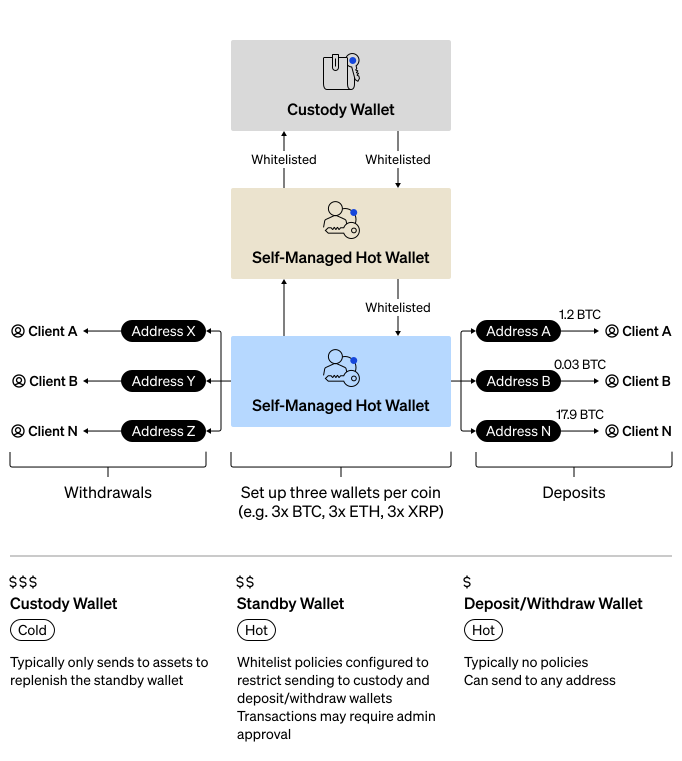
Custody starter architecture is the recommended integration pattern for individual enterprises that want to maximize security while maintaining operational flexibility. This architecture uses a three-wallet structure per coin that balances security requirements with day-to-day operational needs. If your use cases requires multiple enterprises, see [Crypto-as-a-Service (CaaS)](/docs/crypto-as-a-service-overview).
This guide walks you through setting up the following:
- **Custody wallet** - A qualified custody cold wallet where you keep majority of your assets. This wallet has the strictest security protocols that govern the movement of assets between it and the standby wallet.
- **Standby wallet** - A self-custody wallet for intermediate funds. This wallet contains a smaller balance than your custody wallet and has less strict policies to enable more flexibility.
- **Deposit/withdraw wallet** - A second self-custody wallet for daily operations. This wallet contains the smallest balance of the three wallets and it has the most freedom and flexibility, enabling small withdraws without approvals.
- **Whitelists** - The policies that govern the movement of assets between the three wallets.
- **Receive Addresses** - Unique receive address on the deposit/withdraw wallet for everyone in your enterprise.
You can [download](https://assets.bitgo.com/downloads/bitgo_custody_starter_architecture_postman_collection.json) the Postman Collection and import it into [Postman](https://www.postman.com/) to quickly explore and test the APIs.
 ### Wallet Roles
| Wallet | Type | Balance | Policies | Purpose |
| :----- | :--- | :------ | :------- | :------ |
| **Custody Wallet** | Custody cold | Majority of assets | Strictest: admin approvals, velocity limits, whitelist | Long-term secure storage. |
| **Standby Wallet** | Self-Custody | Intermediate amount | Admin approval for withdrawals, whitelist | Buffer between cold storage and operations. |
| **Deposit/Withdraw Wallet** | Self-Custody | Smallest amount | None | Day-to-day customer transactions. |
### Fund Flow
1. **Deposits**: Wallets outside of your enterprise can deposit into the deposit/withdraw wallet.
2. **Accumulation**: Periodically move accumulated assets from the deposit/withdraw wallet to the standby wallet.
3. **Cold Storage**: Move excess funds from the standby wallet to the custody wallet for more secure storage.
4. **Withdrawals**: People in your enterprise can withdrawal to wallets outside of your enterprise using the deposit/withdraw wallet.
5. **Replenishment**: When the deposit/withdraw wallet runs low, replenish from the standby wallet.
6. **Major Replenishment**: When the standby wallet runs low, replenish from the custody wallet.
### Security Benefits
- **Limited Exposure**: Only a small portion of assets are in the most accessible wallet.
- **Layered Security**: Multiple approval checkpoints before accessing cold storage.
- **Whitelist Restrictions**: Funds can only move between designated wallets.
- **Audit Trail**: All fund movements require explicit authorization.
### Policy Recommendations
| Wallet | Recommended Policies |
| :----- | :------------------- |
| **Custody Wallet** | Require multiple admin approvals, velocity limits (e.g., max withdrawal per day), whitelist to standby wallet only. |
| **Standby Wallet** | May require admin approval for withdrawals, whitelist to custody and deposit/withdraw wallets only. |
| **Deposit/Withdraw Wallet** | No policies (or minimal), allows spenders to withdraw freely for daily operations. |
## Prerequisites
- [Get Started](/docs/get-started-intro)
- Understand [BitGo Wallet Types](/docs/wallet-types)
## Steps
Set up your custody starter architecture by following these guides:
1. [Set Up Custody Wallet](/docs/custody-starter-architecture-custody-wallet) - Set up your cold storage wallet.
2. [Set Up Standby Wallet](/docs/custody-starter-architecture-standby-wallet) - Set up your intermediate hot wallet.
3. [Create Whitelists](/docs/custody-starter-architecture-whitelists) - Configure whitelist policies between wallets.
4. [Set Up Deposit/Withdraw Wallet](/docs/custody-starter-architecture-deposit-withdraw-wallet) - Set up your operational hot wallet.
5. [Create Receive Addresses](/docs/custody-starter-architecture-receive-addresses) - Create addresses for individuals in your enterprise.
## See Also
- [Wallets Overview](/docs/wallets-overview)
- [Policies Overview](/docs/policies-overview)
- [Create Whitelists](/docs/wallets-whitelists-create)
- [BitGo Wallet Types](/docs/wallet-types)
### Wallet Roles
| Wallet | Type | Balance | Policies | Purpose |
| :----- | :--- | :------ | :------- | :------ |
| **Custody Wallet** | Custody cold | Majority of assets | Strictest: admin approvals, velocity limits, whitelist | Long-term secure storage. |
| **Standby Wallet** | Self-Custody | Intermediate amount | Admin approval for withdrawals, whitelist | Buffer between cold storage and operations. |
| **Deposit/Withdraw Wallet** | Self-Custody | Smallest amount | None | Day-to-day customer transactions. |
### Fund Flow
1. **Deposits**: Wallets outside of your enterprise can deposit into the deposit/withdraw wallet.
2. **Accumulation**: Periodically move accumulated assets from the deposit/withdraw wallet to the standby wallet.
3. **Cold Storage**: Move excess funds from the standby wallet to the custody wallet for more secure storage.
4. **Withdrawals**: People in your enterprise can withdrawal to wallets outside of your enterprise using the deposit/withdraw wallet.
5. **Replenishment**: When the deposit/withdraw wallet runs low, replenish from the standby wallet.
6. **Major Replenishment**: When the standby wallet runs low, replenish from the custody wallet.
### Security Benefits
- **Limited Exposure**: Only a small portion of assets are in the most accessible wallet.
- **Layered Security**: Multiple approval checkpoints before accessing cold storage.
- **Whitelist Restrictions**: Funds can only move between designated wallets.
- **Audit Trail**: All fund movements require explicit authorization.
### Policy Recommendations
| Wallet | Recommended Policies |
| :----- | :------------------- |
| **Custody Wallet** | Require multiple admin approvals, velocity limits (e.g., max withdrawal per day), whitelist to standby wallet only. |
| **Standby Wallet** | May require admin approval for withdrawals, whitelist to custody and deposit/withdraw wallets only. |
| **Deposit/Withdraw Wallet** | No policies (or minimal), allows spenders to withdraw freely for daily operations. |
## Prerequisites
- [Get Started](/docs/get-started-intro)
- Understand [BitGo Wallet Types](/docs/wallet-types)
## Steps
Set up your custody starter architecture by following these guides:
1. [Set Up Custody Wallet](/docs/custody-starter-architecture-custody-wallet) - Set up your cold storage wallet.
2. [Set Up Standby Wallet](/docs/custody-starter-architecture-standby-wallet) - Set up your intermediate hot wallet.
3. [Create Whitelists](/docs/custody-starter-architecture-whitelists) - Configure whitelist policies between wallets.
4. [Set Up Deposit/Withdraw Wallet](/docs/custody-starter-architecture-deposit-withdraw-wallet) - Set up your operational hot wallet.
5. [Create Receive Addresses](/docs/custody-starter-architecture-receive-addresses) - Create addresses for individuals in your enterprise.
## See Also
- [Wallets Overview](/docs/wallets-overview)
- [Policies Overview](/docs/policies-overview)
- [Create Whitelists](/docs/wallets-whitelists-create)
- [BitGo Wallet Types](/docs/wallet-types)