

Crypto-as-a-Service
Complete Know Your Customer (KYC) Verification
Overview
The Know Your Customer (KYC) API enables you to programmatically verify the information of users onboarding to your platform and ensure regulatory compliance. Your end users must complete KYC verification before they can use BitGo products on your platform.
The service user doesn't require additional KYC verification because they completed KYC when you first added them to BitGo.
Supported Regions
BitGo supports KYC verification for end users under two trust entities. The transactionType you use when submitting KYC determines which trust entity and regulatory framework applies to your end user.
| Region | Trust Entity | Transaction Type |
|---|---|---|
| United States | BitGo Bank & Trust | institutionalIndividual |
| European Union | BitGo Europe GmbH | euIndividual |
Note
BitGo Europe GmbH is the sole EU legal entity holding all EU licenses and services all EEA (European Economic Area) countries.
Prerequisites
- Get Started
- Set Up Organization
- Set Up Child Enterprise
- Setup Organization Webhooks (optional)
- You can set up webhooks to monitor the KYC process in real-time. Create an
identityStatustype webhook to receive events whenever the identity status changes.
- You can set up webhooks to monitor the KYC process in real-time. Create an
- KYC Verification Simulation Flows - Test environment
- You can simulate KYC verification end-to-end flows in the test environment by following the guide using specific debugging parameters.
- You must be the service user.
Cookbook
Need just the steps? Expand the cookbook below to get started:
Complete KYC VerificationOpen CookbookSteps
Select your region:
KYC Lifecycle
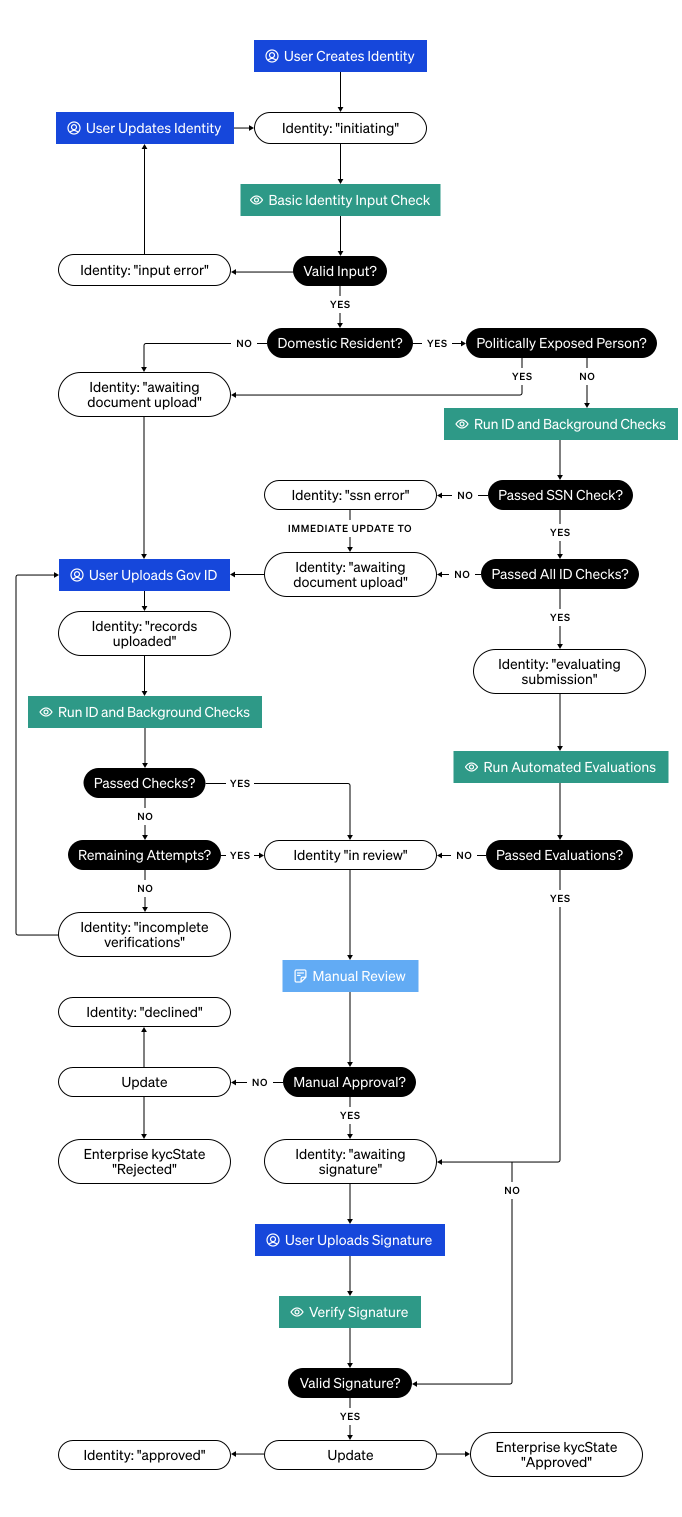
The diagram below provides a high-level overview of the US KYC lifecycle, illustrating the various states an identity can progress through from initial submission to final decision.
1. Submit KYC
Submit basic KYC information for your user. If necessary, uploading supporting documents occurs in the next step.
Endpoint: Create KYC Identity
export ACCESS_TOKEN="<SERVICE_USER_ACCESS_TOKEN>"
export ORGANIZATION_ID="<YOUR_ORGANIZATION_ID>"

curl -X POST \
  https://app.bitgo-test.com/api/evs/v1/identity \
  -H "Content-Type: application/json" \
  -H "Authorization: Bearer $ACCESS_TOKEN" \
  -d '{
    "enterpriseId": "59cd72485007a239fb00282ed480da1f", # newly created child enterprise for end user
    "userId": "67d28e3dea178ede86f2962e959865a0", # primary contact for the end user of the child enterprise
    "organizationId": "'"$ORGANIZATION_ID"'",
    "nameFirst": "John",
    "nameLast": "Doe",
    "nameMiddle": "F",
    "debugStatus": "passed",
    "debugFailureReason": "",
    "phoneNumber": "+442083661173",
    "birthdate": "2025-03-13T00:00:00Z",
    "occupation": "Other - Default",
    "countryOfCitizenship": "USA",
    "countryOfResidence": "USA",
    "govIdCountryOfIssuance": "USA",
    "identificationNumber": "494-14-2205",
    "politicallyExposedPerson": false,
    "addressStreet1": "Street 1",
    "addressStreet2": "Unit 100",
    "addressCity": "San Jose",
    "addressSubdivision": "CA",
    "country": "USA",
    "transactionType": "institutionalIndividual",
    "addressPostalCode": "33604"
}'
import superagent from 'superagent';
const ACCESS_TOKEN = '<SERVICE_USER_ACCESS_TOKEN>';
const organizationId = '<YOUR_ORGANIZATION_ID>';

const apiUrl = 'https://app.bitgo-test.com/api/evs/v1/identity/';

const params = {
 birthdate: new Date().toISOString(),
 country: 'USA',
 countryOfIncorporation: 'USA',
 countryOfCitizenship: 'USA',
 countryOfResidence: 'USA',
 govIdCountryOfIssuance: 'USA',
 identificationNumber: '494-14-2205',
 addressStreet1: 'Street 1',
 addressCity: 'San Jose',
 addressSubdivision: 'CA',
 addressPostalCode: '33604',
 dateOfIncorporation: '2025-03-13T00:00:00Z',
 debugFailureReason: '',
 debugStatus: 'passed',
 enterpriseId: '59cd72485007a239fb00282ed480da1f', // newly created child enterprise for end user
 userId: '67d28e3dea178ede86f2962e959865a0', // primary contact for the end user of the child enterprise
 nameFirst: 'John',
 nameMiddle: 'F',
 nameLast: 'Doe',
 phoneNumber: '+442083661173',
 occupation: 'Other - Default',
 politicallyExposedPerson: false,
 organizationId,
 transactionType: 'institutionalIndividual',
};

response = await superagent
 .post(apiUrl)
 .set('Authorization', `Bearer ${ACCESS_TOKEN}`)
 .set('Accept', 'application/json')
 .send(params);
Step Result
You create an identity for KYC purposes and BitGo returns the id and status of the created identity. The status is initiating which confirms that BitGo has received the end user's KYC information and is reviewing it.
{
  "id": "993ec85b-ad23-4259-bde5-703a071a0783",
  "status": "initiating"
}
BitGo requires valid tax identification numbers for US individuals (citizens and residents). Populate the identificationNumber field according to these requirements:
| Citizenship | Requirement |
|---|---|
| US citizens | Must provide a valid Social Security Number (SSN) |
| US residents (non-citizens) | Must provide a valid SSN or Individual Taxpayer Identification Number (ITIN) |
| Other non-US individuals (under BitGo Bank & Trust) | Can optionally submit SSN or ITIN if held (e.g. dual nationals, former US residents, etc.) |
2. Check KYC Status
Check the KYC status of your end user to determine next steps.
Endpoint: Get KYC Identity
export ACCESS_TOKEN="<SERVICE_USER_ACCESS_TOKEN>"
export ORGANIZATION_ID="<YOUR_ORGANIZATION_ID>"
export ENTERPRISE_ID="<CHILD_ENTERPRISE_ID>"
export IDENTITY_ID="<END_USER_IDENTITY_ID>"

curl -X GET \
  "https://app.bitgo-test.com/api/evs/v1/identity?organizationId=$ORGANIZATION_ID&enterpriseId=$ENTERPRISE_ID&identityId=$IDENTITY_ID" \
  -H "Content-Type: application/json" \
  -H "Authorization: Bearer $ACCESS_TOKEN"
import superagent from 'superagent';
const ACCESS_TOKEN = '<SERVICE_USER_ACCESS_TOKEN>';
const organizationId = '<YOUR_ORGANIZATION_ID>';
const enterpriseId = '<CHILD_ENTERPRISE_ID>';
const identityId = '<END_USER_IDENTITY_ID>';

const apiUrl = `https://app.bitgo-test.com/api/evs/v1/identity?organizationId=${organizationId}&enterpriseId=${enterpriseId}&identityId=${identityId}`;

const response = await superagent
  .get(apiUrl)
  .set('Authorization', `Bearer ${ACCESS_TOKEN}`);
Note
Use both the organization and enterprise IDs to successfully fetch your end user KYC identity.
Step Result
BitGo returns one of the following KYC statuses:
initiating- BitGo confirms receipt of the end user's KYC information.evaluating submission- BitGo runs automated checks on the submitted KYC information.input error- The name or birthdate fields contain formatting issues. You must update the identity with properly formatted input fields.taxid error- The tax ID submitted is invalid. You must update the identity with a valid tax ID.awaiting document upload- BitGo requires supporting identity verification documents to continue with the review process.in review- BitGo manually reviews the KYC information.awaiting signature- BitGo completes review of the KYC information and now requires you to confirm verification with a signature.incomplete verifications- BitGo can't complete verification using the provided documents. You must re-upload identity verification documents for the end user. BitGo recommends uploading a different kind of identity verification document.approved- BitGo approves your end user's KYC verification and marks it as complete.declined- BitGo declines your end user's KYC verification.
{
    "identities": [
        {
            "id": "5436ff2e-1129-49f1-8334-1510955ffe00",
            "status": "awaiting document upload",
            "organizationId": "68928b9066417fe09212fe9965c88552",
            "enterpriseId": "690a234346b3252214cdaf72070c549e",
            "userId": "690a234046b3252214cdadfe8600df80",
            "createdAt": "2025-11-04T16:05:15.359Z",
            "updatedAt": "2025-11-04T16:05:17.975Z",
            "signaturesSubmitted": [],
            "signaturesRequired": []
        }
    ]
}
3. Submit Documents
If the end user's KYC status is awaiting document upload, you must submit their identity verification documents. Document submission requirements vary by citizenship:
| Citizenship | Documentation Required? |
|---|---|
| US citizens | Not required unless BitGo explicitly requests it |
| Non-US citizens (under BitGo Bank & Trust) | Identity verification documents required |
BitGo recommends submitting all necessary documents for an end user in a single API call. Document files can't exceed 15MB and must be at least 200x200px.
Note
BitGo limits the number of times you can submit documents for each end user. Ensure document quality before submission to avoid exhausting retry attempts.
3.1 Add Documents
Endpoint: Add KYC Documents
export IDENTITY_ID="<END_USER_IDENTITY_ID>"
export ACCESS_TOKEN="<SERVICE_USER_ACCESS_TOKEN>"
export ID_CLASS="<DOCUMENT_ID_CLASS>"

curl -X POST \
  "https://app.bitgo-test.com/api/evs/v1/identity/$IDENTITY_ID/document" \
  -H "Authorization: Bearer $ACCESS_TOKEN" \
  -F "selectedIdClass=$ID_CLASS" \
  -F "frontPhoto=@<PATH_TO_FRONT_PHOTO>" \
  -F "backPhoto=@<PATH_TO_BACK_PHOTO>" \
  -F "proofOfResidency=@<PATH_TO_PROOF_OF_RESIDENCY>"
import superagent from 'superagent';
import FormData from 'form-data';
import fs from 'fs';

const ACCESS_TOKEN = '<SERVICE_USER_ACCESS_TOKEN>';
const identityId = '<END_USER_IDENTITY_ID>';
const idClass = '<DOCUMENT_ID_CLASS>';

const apiUrl = `https://app.bitgo-test.com/api/evs/v1/identity/${identityId}/document`;

const formData = new FormData();
formData.append('selectedIdClass', idClass);
formData.append('frontPhoto', fs.createReadStream('<PATH_TO_FRONT_PHOTO>'));
formData.append('backPhoto', fs.createReadStream('<PATH_TO_BACK_PHOTO>'));
formData.append('proofOfResidency', fs.createReadStream('<PATH_TO_PROOF_OF_RESIDENCY>'));

const response = await superagent
  .post(apiUrl)
  .set('Authorization', `Bearer ${ACCESS_TOKEN}`)
  .send(formData);
Step Result
BitGo returns the following:
- The document ID - A unique ID for the document submission. Store this ID for use if you need to update the document submission.
- The document status - the initial status is
pendingwhich confirms that BitGo has received the document. Other possible statuses include:processing- BitGo is validating the documentapproved- BitGo successfully verified the documentrejected- The document failed verification
- The list of files that you uploaded for the end user including details such as file upload status, document type, and size.
{
  "id": "02f3186c-8589-4lfa-a800-1e5cc169c726",
  "status": "pending",
  "selectedIdClass": "pp",
  "fileUploads": [
      {
          "fileName": "passport-front.jpeg",
          "fileSize": 11275,
          "uploadStatus": "pending",
          "documentType": "frontPhoto"
      }
  ]
}
BitGo processes the documents with the following workflow:
- Initial receipt - The end user's KYC status updates to
records uploaded. - Automated validation - BitGo runs automated checks on the submitted documents.
- Then, one of the following occurs:
- Validation passed or failed with no retry attempts remaining: - The end user's status updates to
in reviewfor manual review by BitGo. - Validation failed (with retry attempts remaining): The end user's status updates to
incomplete verifications, and you must re-upload improved documentation.
- Validation passed or failed with no retry attempts remaining: - The end user's status updates to
3.2 Get Documents
After submitting documents, you can retrieve the document details to check upload status and verify file information.
Endpoint: Get KYC Document
export ACCESS_TOKEN="<SERVICE_USER_ACCESS_TOKEN>"
export IDENTITY_ID="<END_USER_IDENTITY_ID>"
export DOCUMENT_ID="<DOCUMENT_ID>"

curl -X GET \
  "https://app.bitgo-test.com/api/evs/v1/identity/document?identityId=$IDENTITY_ID&documentId=$DOCUMENT_ID" \
  -H "Content-Type: application/json" \
  -H "Authorization: Bearer $ACCESS_TOKEN"
import superagent from 'superagent';

const ACCESS_TOKEN = '<SERVICE_USER_ACCESS_TOKEN>';
const identityId = '<END_USER_IDENTITY_ID>';
const documentId = '<DOCUMENT_ID>';

const apiUrl = `https://app.bitgo-test.com/api/evs/v1/identity/document?identityId=${identityId}&documentId=${documentId}`;

const response = await superagent
  .get(apiUrl)
  .set('Content-Type', 'application/json')
  .set('Authorization', `Bearer ${ACCESS_TOKEN}`);
Note
You can query by either identityId or documentId, or both. At least one parameter is required.
Step Result
{
  "documents": [
    {
      "id": "02f3186c-8589-4lfa-a800-1e5cc169c726",
      "status": "processing",
      "selectedIdClass": "pp",
      "fileUploads": [
        {
          "fileName": "passport-front.jpeg",
          "fileSize": 11275,
          "uploadStatus": "uploaded",
          "documentType": "frontPhoto"
        },
        {
          "fileName": "passport-back.jpeg",
          "fileSize": 10842,
          "uploadStatus": "uploaded",
          "documentType": "backPhoto"
        }
      ]
    }
  ]
}
3.3 Update Documents
You can only update documents when the KYC status is incomplete verifications. Verify the status before proceeding.
Endpoint: Update KYC Document
export IDENTITY_ID="<END_USER_IDENTITY_ID>"
export ACCESS_TOKEN="<SERVICE_USER_ACCESS_TOKEN>"
export ID_CLASS="<DOCUMENT_ID_CLASS>"
export DOCUMENT_ID="<DOCUMENT_ID>" # The ID of the document initially created

curl -X PUT \
  "https://app.bitgo-test.com/api/evs/v1/identity/$IDENTITY_ID/document/$DOCUMENT_ID" \
  -H "Authorization: Bearer $ACCESS_TOKEN" \
  -F "selectedIdClass=$ID_CLASS" \
  -F "frontPhoto=@<PATH_TO_FRONT_PHOTO>" \
  -F "backPhoto=@<PATH_TO_BACK_PHOTO>" \
  -F "proofOfResidency=@<PATH_TO_PROOF_OF_RESIDENCY>"
import superagent from 'superagent';
import FormData from 'form-data';
import fs from 'fs';

const ACCESS_TOKEN = '<SERVICE_USER_ACCESS_TOKEN>';
const identityId = '<END_USER_IDENTITY_ID>';
const idClass = '<DOCUMENT_ID_CLASS>';
const documentId = '<DOCUMENT_ID>'; // The ID of the document initially created

const apiUrl = `https://app.bitgo-test.com/api/evs/v1/identity/${identityId}/document/${documentId}`;

const formData = new FormData();
formData.append('selectedIdClass', idClass);
formData.append('frontPhoto', fs.createReadStream('<PATH_TO_FRONT_PHOTO>'));
formData.append('backPhoto', fs.createReadStream('<PATH_TO_BACK_PHOTO>'));
formData.append('proofOfResidency', fs.createReadStream('<PATH_TO_PROOF_OF_RESIDENCY>'));

const response = await superagent
  .put(apiUrl)
  .set('Authorization', `Bearer ${ACCESS_TOKEN}`)
  .send(formData);
Step Result
{
  "id": "02f3186c-8589-4lfa-a800-1e5cc169c726",
  "status": "pending",
  "selectedIdClass": "pp",
  "fileUploads": [
      {
          "fileName": "passport-front.jpeg",
          "fileSize": 11275,
          "uploadStatus": "pending",
          "documentType": "frontPhoto"
      }
  ]
}
4. Sign Completed KYC
Once BitGo approves the KYC verification, your end user must sign to confirm. You can repeat step 2, Check KYC Status, to verify when the end user is awaiting signature.
Endpoint: Submit KYC Signatures
export IDENTITY_ID="<END_USER_IDENTITY_ID>"
export ACCESS_TOKEN="<SERVICE_USER_ACCESS_TOKEN>"

curl -X POST \
  "https://app.bitgo-test.com/api/evs/v1/identity/$IDENTITY_ID/signatures" \
  -H "Content-Type: application/json" \
  -H "Authorization: Bearer $ACCESS_TOKEN" \
  -d '[
    {
      "contractSignerNameFull": "John Smith",
      "contractSignedDate": "2025-03-13 13:14:09.767480+00:00",
      "contractSignedIPAddress": "123.123.123.123",
      "contractVersion": "1.0",
      "contractType": "csa",
      "userAgreesToTerms": true
    },
    {
      "contractSignerNameFull": "John Smith",
      "contractSignedDate": "2025-03-13 13:14:09.767480+00:00",
      "contractSignedIPAddress": "123.123.123.123",
      "contractVersion": "1.0",
      "contractType": "mpa",
      "userAgreesToTerms": true
    },
    {
      "contractSignerNameFull": "Jerry Smith",
      "contractSignedDate": "2025-03-13 13:14:09.767480+00:00",
      "contractSignedIPAddress": "123.123.123.123",
      "contractVersion": "1.0",
      "contractType": "mic",
      "userAgreesToTerms": true
    }
  ]'
import superagent from 'superagent';
const ACCESS_TOKEN = '<SERVICE_USER_ACCESS_TOKEN>';
const IDENTITY_ID = '<END_USER_IDENTITY_ID>';

const apiUrl = `https://app.bitgo-test.com/api/evs/v1/identity/${IDENTITY_ID}/signatures`;

const params = [
 {
   "contractSignerNameFull": "John Smith",
   "contractSignedDate": "2025-03-13 13:14:09.767480+00:00",
   "contractSignedIPAddress": "123.123.123.123",
   "contractVersion": "1.0",
   "contractType": "csa",
   "userAgreesToTerms": true
 },
 {
   "contractSignerNameFull": "Jay Smith",
   "contractSignedDate": "2025-03-13 13:14:09.767480+00:00",
   "contractSignedIPAddress": "123.123.123.123",
   "contractVersion": "1.0",
   "contractType": "mpa",
   "userAgreesToTerms": true
 },
 {
   "contractSignerNameFull": "Jerry Smith",
   "contractSignedDate": "2025-03-13 13:14:09.767480+00:00",
   "contractSignedIPAddress": "123.123.123.123",
   "contractVersion": "1.0",
   "contractType": "mic",
   "userAgreesToTerms": true
 }
];

response = await superagent
 .post(apiUrl)
 .set('Authorization', `Bearer ${ACCESS_TOKEN}`)
 .set('Accept', 'application/json')
 .send(params);
Step Result
{
  "id": "cf5d766d-bef1-4874-8b02-54ded0e8333e",
  "status": "signature submitted",
  "organizationId": "6573806ef79cafdd1aff42fbffc2ab20",
  "enterpriseId": "67d28e40ea178ede86f296ac90032286",
  "userId": "67d28e3dea178ede86f2962e959865a0",
  "updatedAt": "2025-03-13T07:59:52.564Z",
  "createdAt": "2025-03-13T07:54:18.842Z",
  "errorDescription": "",
  "signaturesSubmitted": ["<CONTRACT_TYPE_1>", "<CONTRACT_TYPE_2>"],
  "signaturesRequired": []
}
Simulating KYC Flows
You can simulate different KYC verification flows to test your integration without manual review from BitGo.
The debugStatus field enables you to control the KYC verification flow during testing. It accepts failed and passed as valid values and defaults to passed.
You can also pass debugFailureReason to get more specific errors on the identity errorDescription, this does not impact the KYC flow and is supplementary to debugStatus. Some possible values with specific error message mappings are: expired, cannot_verify_id, portrait_not_found, portrait_not_clear, face_mismatch, etc.
You can set both debugStatus and debugFailureReason when creating an identity and you can only update these fields when the identity status is awaiting document upload or incomplete verifications using the Update KYC Identity endpoint.
Note
The following test paths are only available in the BitGo test environment.
This path simulates the fastest approval scenario where document upload is not required.
Steps
- Create an identity for a non-PEP (politically exposed person) US citizen without the
debugStatusparameter.- Recommendation: Avoid using New York (NY) as the state, as NY-based identities may sometimes require additional documentation.
- The identity status automatically progresses to
awaiting signature, bypassing document upload. - Submit the required signatures.
Expected Outcome
The identity status updates to approved without requiring document upload.
This path simulates approval after document upload and review.
Steps
- Create an identity for a non-US citizen/PEP or set
debugStatustofailed. - The identity status updates to
awaiting document upload. - Important: If you initially set
debugStatustofailed, update it topassed. - Submit the identity verification documents.
- The identity status progresses from
in reviewtoawaiting signature. - Submit the required signatures.
Expected Outcome
The identity status updates to approved after successful document verification and signature submission.
This path simulates the resubmission workflow when initial document verification fails.
Steps
- Create an identity for a non-US citizen/PEP or set
debugStatustofailed. - The identity status updates to
awaiting document upload. - Important: Ensure
debugStatusis set tofailed. If not, update the identity. - Submit the identity verification documents.
- The identity status updates to
incomplete verifications. - Update
debugStatustopassedon the identity. - Resubmit improved documents.
- The identity status progresses from
in reviewtoawaiting signature. - Submit the required signatures.
Expected Outcome
The identity status updates to approved after successful document resubmission and signature submission.
Note
BitGo enables a limited number of resubmission attempts when the status is incomplete verifications. Use this path to test your error handling and resubmission logic.
This path simulates a declined KYC after exhausting all resubmission attempts.
Steps
- Create an identity for a non-US citizen/PEP or set
debugStatustofailed. - The identity status updates to
awaiting document upload. - Important: Ensure
debugStatusis set tofailedand remains set tofailedthroughout all submission attempts. - Submit the identity verification documents.
- The identity status updates to
incomplete verifications. - Repeat document submission until you exhaust all attempts.
- After the final failed attempt, the identity status automatically progresses from
in reviewtodeclined.
Expected Outcome
The identity status updates to declined after exhausting all resubmission attempts with failed verifications.
Note
Use this path to test your integration's handling of declined KYC scenarios and ensure your application properly notifies end users when BitGo rejects their KYC.
Overview
Use this flow if your entity is regulated as an obliged entity under EU AML law, for example you hold a MiCA, MiFID, full banking, EMI, or payment-services license, or you operate under a regulated partner that holds one. If you only hold a Virtual Asset Service Provider (VASP) registration (or no financial-services license at all), use the EU Unregulated tab instead.
As a regulated entity, your platform carries independent compliance obligations alongside BitGo's, so ensure your onboarding flow requires each EEA customer to execute the Custodial Services Agreement and Electronic Trading Agreement (Schedules B-1 and B-2) before they access BitGo Services.
KYC Lifecycle
EU KYC is simpler than the US KYC, because it doesn't require uploading documents. BitGo handles KYC for EU individuals through an identity verification (IDV) flow that your end users complete during onboarding.
EU identity states:
initiating— BitGo confirms receipt of the end user's KYC information.input error— Name or birthdate fields contain formatting issues. You must update the identity before it can proceed.in review— BitGo manually reviews the KYC information.awaiting signature— BitGo completes review and requires the end user to confirm verification with a signature.signature submitted— The end user has signed; final processing is in progress.approvedordeclined— Final outcome of the KYC review.
Unlike the US flow, EU identities don't enter awaiting document upload or incomplete verifications states.
1. Submit KYC
Submit KYC information for your end user.
Endpoint: Create KYC Identity
export ACCESS_TOKEN="<SERVICE_USER_ACCESS_TOKEN>"
export ORGANIZATION_ID="<YOUR_ORGANIZATION_ID>"

curl -X POST \
  https://app.bitgo-test.com/api/evs/v1/identity \
  -H "Content-Type: application/json" \
  -H "Authorization: Bearer $ACCESS_TOKEN" \
  -d '{
    "enterpriseId": "59cd72485007a239fb00282ed480da1f",
    "userId": "67d28e3dea178ede86f2962e959865a0",
    "organizationId": "'"$ORGANIZATION_ID"'",
    "externalUserId": "external-user-hans-mueller-001",
    "transactionType": "euIndividual",
    "nameFirst": "Hans",
    "nameLast": "Müller",
    "dateOfBirth": {
      "year": "1985",
      "month": "06",
      "day": "15"
      },
    "cityOfBirth": "Frankfurt am Main",
    "countryOfBirth": "DEU",
    "countryOfCitizenship": "DEU",
    "countryOfResidence": "DEU",
    "taxId": "12345678901",
    "countryOfTaxResidence": "DEU",
    "industry": "Software & IT Services",
    "employmentStatus": "Employee",
    "sourceOfFunds": "Income from Employment",
    "email": "hans.mueller@example.com",
    "phoneNumber": "+4969123456789",
    "politicallyExposedPerson": false,
    "idvPerformed": true,
    "initialKycCompletionDate": {
      "year": "2024",
      "month": "01",
      "day": "10"
      },
    "lastKycCompletionDate": {
      "year": "2025",
      "month": "03",
      "day": "13"
      },
    "govIdType": "pp",
    "govIdNumber": "C01X00T47",
    "govIdExpiry": {
      "year": "2030",
      "month": "12",
      "day": "31"
      },
    "govIdCountryOfIssuance": "DEU",
    "addressStreet1": "Mainzer Landstraße 50",
    "addressCity": "Frankfurt am Main",
    "addressPostalCode": "60325",
    "debugStatus": "passed",
    "debugFailureReason": ""
}'
Key requirements for EU individuals
- Use
"transactionType": "euIndividual"to route the identity to BitGo Europe GmbH. - Use ISO 3166-1 country codes for
countryOfCitizenship,countryOfResidence,countryOfBirth,countryOfTaxResidence, andgovIdCountryOfIssuance. The API accepts both alpha-2 ("DE") and alpha-3 ("DEU") formats. - Provide
taxId(EU tax identification number) instead ofidentificationNumber(US SSN/ITIN), which does not apply to EU individuals. - Date fields (
dateOfBirth,govIdExpiry,initialKycCompletionDate,lastKycCompletionDate) accept a{ "year", "month", "day" }object, not the ISO timestamp strings used by the US schema. ThelastKycCompletionDatevalue must fall within the last 2 years. industry,employmentStatus, andsourceOfFundsare required enums. AcceptedsourceOfFundsvalues:"Income from Employment","Pension","Income from Renting and Leasing","Income from Self-Employment","Inheritance / Gift","Crypto","Other Financial Support".govIdTypeaccepts:pp(passport),ppc(passport card),rp(residence permit),pr(permanent residence),id(national ID). ForEURegulatedenterprises, all four government ID fields are required:govIdType,govIdNumber,govIdExpiry, andgovIdCountryOfIssuance.
Step Result
You create an identity for KYC purposes and BitGo returns the id and status of the created identity. The status is initiating which confirms that BitGo has received the end user's KYC information and is reviewing it.
{
  "id": "993ec85b-ad23-4259-bde5-703a071a0783",
  "status": "initiating"
}
2. Check KYC Status
Check the KYC status of your end user to determine next steps.
Endpoint: Get KYC Identity
export ACCESS_TOKEN="<SERVICE_USER_ACCESS_TOKEN>"
export ORGANIZATION_ID="<YOUR_ORGANIZATION_ID>"
export ENTERPRISE_ID="<CHILD_ENTERPRISE_ID>"
export IDENTITY_ID="<END_USER_IDENTITY_ID>"

curl -X GET \
  "https://app.bitgo-test.com/api/evs/v1/identity?organizationId=$ORGANIZATION_ID&enterpriseId=$ENTERPRISE_ID&identityId=$IDENTITY_ID" \
  -H "Content-Type: application/json" \
  -H "Authorization: Bearer $ACCESS_TOKEN"
import superagent from 'superagent';
const ACCESS_TOKEN = '<SERVICE_USER_ACCESS_TOKEN>';
const organizationId = '<YOUR_ORGANIZATION_ID>';
const enterpriseId = '<CHILD_ENTERPRISE_ID>';
const identityId = '<END_USER_IDENTITY_ID>';

const apiUrl = `https://app.bitgo-test.com/api/evs/v1/identity?organizationId=${organizationId}&enterpriseId=${enterpriseId}&identityId=${identityId}`;

const response = await superagent
  .get(apiUrl)
  .set('Authorization', `Bearer ${ACCESS_TOKEN}`);
Note
Use both the organization and enterprise IDs to successfully fetch your end user KYC identity.
Step Result
BitGo returns one of the following KYC statuses:
initiating- BitGo confirms receipt of the end user's KYC information.evaluating submission- BitGo runs automated checks on the submitted KYC information.input error- The name or birthdate fields contain formatting issues. You must update the identity with properly formatted input fields.in review- BitGo manually reviews the KYC information.awaiting signature- BitGo completes review of the KYC information and now requires you to confirm verification with a signature.approved- BitGo approves your end user's KYC verification and marks it as complete.declined- BitGo declines your end user's KYC verification.
{
    "identities": [
        {
            "id": "5436ff2e-1129-49f1-8334-1510955ffe00",
            "status": "in review",
            "organizationId": "68928b9066417fe09212fe9965c88552",
            "enterpriseId": "690a234346b3252214cdaf72070c549e",
            "userId": "690a234046b3252214cdadfe8600df80",
            "createdAt": "2025-11-04T16:05:15.359Z",
            "updatedAt": "2025-11-04T16:05:17.975Z",
            "signaturesSubmitted": [],
            "signaturesRequired": []
        }
    ]
}
3. Sign Completed KYC
Once BitGo approves the KYC verification, your end user must sign to confirm. You can repeat step 2, Check KYC Status, to verify when the end user is awaiting signature.
Your organization's agreements with BitGo determine the required contractType values — contact BitGo if you are unsure which contract types apply to your integration.
Each signature object serves as a digital record of the end user's agreement. The contractSignerNameFull, contractSignedDate, and contractSignedIPAddress fields together capture the full name, timestamp, and IP address that constitute the electronic signature.
Endpoint: Submit KYC Signatures
export IDENTITY_ID="<END_USER_IDENTITY_ID>"
export ACCESS_TOKEN="<SERVICE_USER_ACCESS_TOKEN>"

curl -X POST \
  "https://app.bitgo-test.com/api/evs/v1/identity/$IDENTITY_ID/signatures" \
  -H "Content-Type: application/json" \
  -H "Authorization: Bearer $ACCESS_TOKEN" \
  -d '[
    {
      "contractSignerNameFull": "Hans Müller",
      "contractSignedDate": "2025-03-13 13:14:09.767480+00:00",
      "contractSignedIPAddress": "123.123.123.123",
      "contractVersion": "1.0",
      "contractType": "<EU_CONTRACT_TYPE>",
      "userAgreesToTerms": true
    }
  ]'
Step Result
{
  "id": "cf5d766d-bef1-4874-8b02-54ded0e8333e",
  "status": "signature submitted",
  "organizationId": "6573806ef79cafdd1aff42fbffc2ab20",
  "enterpriseId": "67d28e40ea178ede86f296ac90032286",
  "userId": "67d28e3dea178ede86f2962e959865a0",
  "updatedAt": "2025-03-13T07:59:52.564Z",
  "createdAt": "2025-03-13T07:54:18.842Z",
  "errorDescription": "",
  "signaturesSubmitted": ["<CONTRACT_TYPE_1>", "<CONTRACT_TYPE_2>"],
  "signaturesRequired": []
}
Overview
Use this flow if your entity is not itself licensed as a financial-services obliged entity under EU AML law, for example you only hold a Virtual Asset Service Provider (VASP) registration. If you are licensed under MiCA, MiFID, a full banking license, EMI, or payment-services, or operate under a regulated partner that is, use the EU Regulated tab instead.
Although your platform has no independent licensing obligations, all BitGo onboarding requirements still apply, so ensure your onboarding flow requires each EEA customer to execute the Custodial Services Agreement and Electronic Trading Agreement (Schedules B-1 and B-2) before they access BitGo Services.
KYC Lifecycle
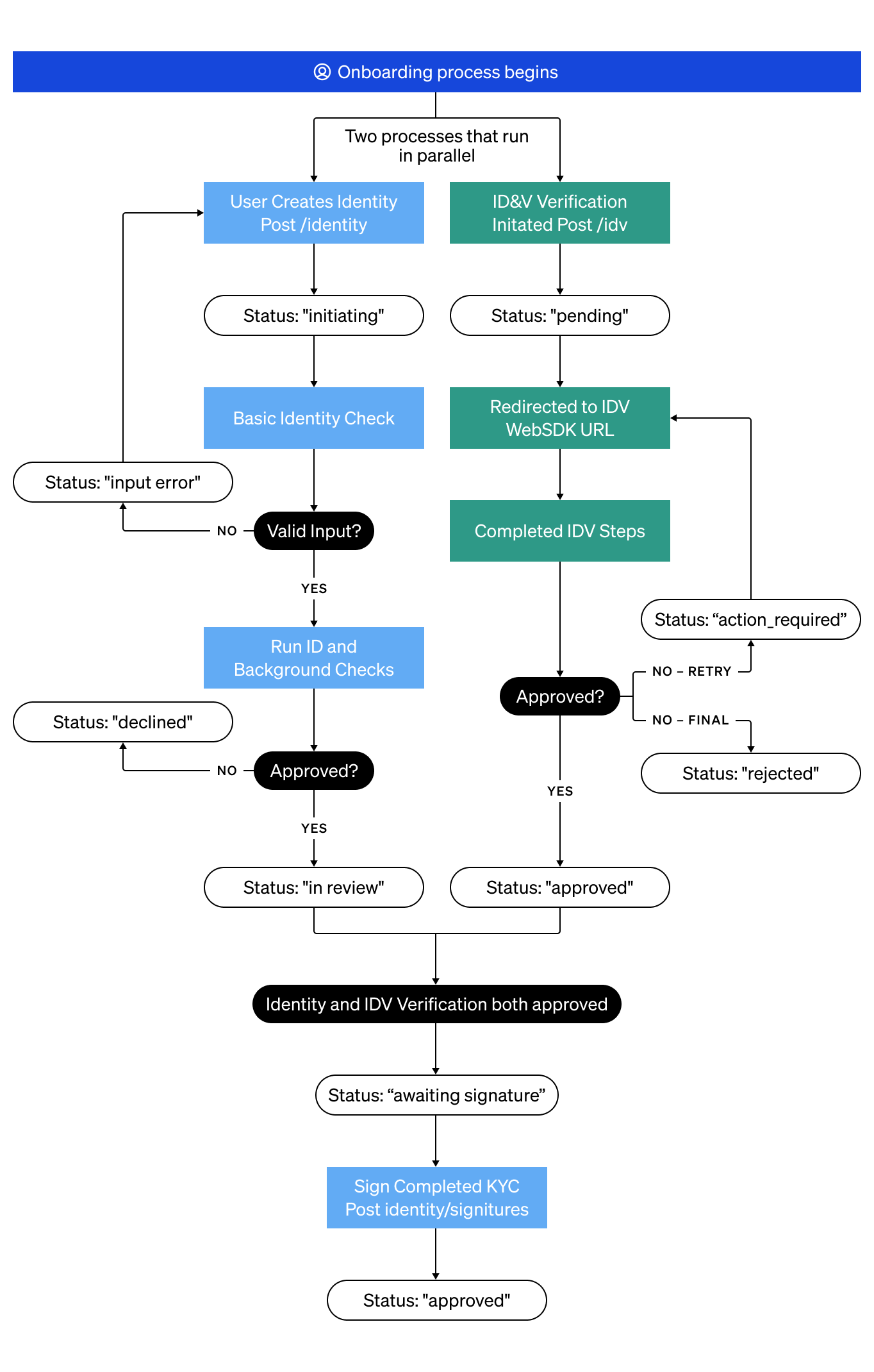
The EU unregulated KYC lifecycle requires a dual-approval model. Your end users must pass both a standard identity check and an IDV step before BitGo clears them. The identity check and IDV run independently, so you don't need to wait for one to complete before starting the other.
1. Submit KYC
Submit basic KYC information for your user.
Endpoint: Create KYC Identity
export ACCESS_TOKEN="<SERVICE_USER_ACCESS_TOKEN>"
export ORGANIZATION_ID="<YOUR_ORGANIZATION_ID>"

curl -X POST \
  https://app.bitgo-test.com/api/evs/v1/identity \
  -H "Content-Type: application/json" \
  -H "Authorization: Bearer $ACCESS_TOKEN" \
  -d '{
    "enterpriseId": "59cd72485007a239fb00282ed480da1f",
    "userId": "67d28e3dea178ede86f2962e959865a0",
    "organizationId": "'"$ORGANIZATION_ID"'",
    "externalUserId": "external-user-hans-mueller-001",
    "transactionType": "euIndividual",
    "nameFirst": "Hans",
    "nameLast": "Müller",
    "dateOfBirth": {
      "year": "1985",
      "month": "06",
      "day": "15"
      },
    "cityOfBirth": "Frankfurt am Main",
    "countryOfBirth": "DEU",
    "countryOfCitizenship": "DEU",
    "countryOfResidence": "DEU",
    "taxId": "12345678901",
    "countryOfTaxResidence": "DEU",
    "industry": "Software & IT Services",
    "employmentStatus": "Employee",
    "sourceOfFunds": "Income from Employment",
    "email": "hans.mueller@example.com",
    "phoneNumber": "+4969123456789",
    "politicallyExposedPerson": false,
    "idvPerformed": false,
    "initialKycCompletionDate": {
      "year": "2024",
      "month": "01",
      "day": "10"
      },
    "lastKycCompletionDate": {
      "year": "2025",
      "month": "03",
      "day": "13"
      },
    "addressStreet1": "Mainzer Landstraße 50",
    "addressCity": "Frankfurt am Main",
    "addressPostalCode": "60325",
    "debugStatus": "passed",
    "debugFailureReason": ""
}'
EU unregulated identity statuses
initiating— BitGo confirms receipt of the end user's KYC information.input error— Name or birthdate fields contain formatting issues. You must update the identity before it can proceed.in review— BitGo reviews the KYC information.awaiting signature— BitGo completes review and requires the end user to confirm verification with a signature.signature submitted— The end user has signed; final processing is in progress.approvedordeclined— Final outcome of the KYC review.
Step Result
You create an identity for KYC purposes and BitGo returns the id and status of the created identity. The status is initiating which confirms that BitGo has received the end user's KYC information and is reviewing it.
{
  "id": "993ec85b-ad23-4259-bde5-703a071a0783",
  "status": "initiating"
}
2. (Optional) Check KYC Status
Check the KYC status of your end user to determine next steps.
Endpoint: Get KYC Identity
export ACCESS_TOKEN="<SERVICE_USER_ACCESS_TOKEN>"
export ORGANIZATION_ID="<YOUR_ORGANIZATION_ID>"
export ENTERPRISE_ID="<CHILD_ENTERPRISE_ID>"
export IDENTITY_ID="<END_USER_IDENTITY_ID>"

curl -X GET \
  "https://app.bitgo-test.com/api/evs/v1/identity?organizationId=$ORGANIZATION_ID&enterpriseId=$ENTERPRISE_ID&identityId=$IDENTITY_ID" \
  -H "Content-Type: application/json" \
  -H "Authorization: Bearer $ACCESS_TOKEN"
import superagent from 'superagent';
const ACCESS_TOKEN = '<SERVICE_USER_ACCESS_TOKEN>';
const organizationId = '<YOUR_ORGANIZATION_ID>';
const enterpriseId = '<CHILD_ENTERPRISE_ID>';
const identityId = '<END_USER_IDENTITY_ID>';

const apiUrl = `https://app.bitgo-test.com/api/evs/v1/identity?organizationId=${organizationId}&enterpriseId=${enterpriseId}&identityId=${identityId}`;

const response = await superagent
  .get(apiUrl)
  .set('Authorization', `Bearer ${ACCESS_TOKEN}`);
Note
You can create an organization webhook with the identityStatus type to receive automatic notifications when a user's identity status changes. For details, see Create Webhooks.
Step Result
BitGo returns one of the following KYC statuses:
initiating- BitGo confirms receipt of the end user's KYC information.input error- The name or birthdate fields contain formatting issues. You must update the identity with properly formatted input fields.in review- BitGo reviews the KYC information.awaiting signature- BitGo completes review of the KYC information and now requires you to confirm verification with a signature.approved- BitGo approves your end user's KYC verification and marks it as complete.declined- BitGo declines your end user's KYC verification.
{
    "identities": [
        {
            "id": "5436ff2e-1129-49f1-8334-1510955ffe00",
            "status": "in review",
            "organizationId": "68928b9066417fe09212fe9965c88552",
            "enterpriseId": "690a234346b3252214cdaf72070c549e",
            "userId": "690a234046b3252214cdadfe8600df80",
            "createdAt": "2025-11-04T16:05:15.359Z",
            "updatedAt": "2025-11-04T16:05:17.975Z",
            "signaturesSubmitted": [],
            "signaturesRequired": []
        }
    ]
}
3. Sign Completed KYC
Once BitGo approves the KYC verification, your end user must sign to confirm. You can repeat Step 2, Check KYC Status, to verify when the end user is awaiting signature.
Your organization's agreements with BitGo determine the required contractType values. If you're unsure which contract types apply to your integration, contact your customer service manager (CSM) or support@bitgo.com.
Each signature object serves as a digital record of the end user's agreement. The contractSignerNameFull, contractSignedDate, and contractSignedIPAddress fields together capture the full name, timestamp, and IP address that constitute the electronic signature.
Endpoint: Submit KYC Signatures
export IDENTITY_ID="<END_USER_IDENTITY_ID>"
export ACCESS_TOKEN="<SERVICE_USER_ACCESS_TOKEN>"

curl -X POST \
  "https://app.bitgo-test.com/api/evs/v1/identity/$IDENTITY_ID/signatures" \
  -H "Content-Type: application/json" \
  -H "Authorization: Bearer $ACCESS_TOKEN" \
  -d '[
    {
      "contractSignerNameFull": "Hans Müller",
      "contractSignedDate": "2025-03-13 13:14:09.767480+00:00",
      "contractSignedIPAddress": "123.123.123.123",
      "contractVersion": "1.0",
      "contractType": "<EU_CONTRACT_TYPE>",
      "userAgreesToTerms": true
    }
  ]'
Step Result
{
  "id": "cf5d766d-bef1-4874-8b02-54ded0e8333e",
  "status": "signature submitted",
  "organizationId": "6573806ef79cafdd1aff42fbffc2ab20",
  "enterpriseId": "67d28e40ea178ede86f296ac90032286",
  "userId": "67d28e3dea178ede86f2962e959865a0",
  "updatedAt": "2025-03-13T07:59:52.564Z",
  "createdAt": "2025-03-13T07:54:18.842Z",
  "errorDescription": "",
  "signaturesSubmitted": ["<CONTRACT_TYPE_1>", "<CONTRACT_TYPE_2>"],
  "signaturesRequired": []
}
4. Initiate IDV
After you create the identity, start the IDV process for your end user by redirecting them to the BitGo-hosted verification link.
You can call this endpoint at any point after creating your user's identity. If the user already has an IDV record, this endpoint returns a fresh link without creating a duplicate.
Endpoint: Initiate Sumsub IDV for a user
| Field | Type | Required | Description |
|---|---|---|---|
userId |
string | Yes | The BitGo user ID of the end user |
enterpriseId |
string | Yes | The BitGo child enterprise ID |
verificationType |
penny-drop or video-id |
Yes | The verification flow to use |
sumsubShareToken |
string | No | Share token to copy an existing Sumsub applicant from your own Sumsub environment |
lang |
string | No | ISO 639-1 language code for the WebSDK UI (e.g. "de", "fr"). Defaults to "en". |
includeSdkToken |
boolean | No | When true, returns a Sumsub Mobile SDK token alongside the WebSDK URL. Only valid for verificationType: "video-id". |
export ACCESS_TOKEN="<SERVICE_USER_ACCESS_TOKEN>"

curl -X POST \
  https://app.bitgo.com/api/sumsub-service/v1/idv \
  -H "Content-Type: application/json" \
  -H "Authorization: Bearer $ACCESS_TOKEN" \
  -d '{
    "userId": "<END_USER_USER_ID>",
    "enterpriseId": "<CHILD_ENTERPRISE_ID>",
    "verificationType": "<VERIFICATION_TYPE>"
  }'
# To reuse an existing Sumsub verification, first generate a share token from your
# Sumsub dashboard with `forClientId` set to `bitgo.com_146799`.
# See: https://docs.sumsub.com/reference/generate-share-token
# Then pass that share token in the `sumsubShareToken` field below so BitGo
# copies the existing applicant from your other Sumsub environment.
#
# In production, add BitGo as a sharing partner in your Sumsub dashboard.
# Contact your CSM or support@bitgo.com to request the BitGo partner token.
# See: https://docs.sumsub.com/docs/manage-sharing-partners

export ACCESS_TOKEN="<SERVICE_USER_ACCESS_TOKEN>"

curl -X POST \
  https://app.bitgo.com/api/sumsub-service/v1/idv \
  -H "Content-Type: application/json" \
  -H "Authorization: Bearer $ACCESS_TOKEN" \
  -d '{
    "userId": "<END_USER_USER_ID>",
    "enterpriseId": "<CHILD_ENTERPRISE_ID>",
    "verificationType": "<VERIFICATION_TYPE>",
    "sumsubShareToken": "<SUMSUB_SHARE_TOKEN>"
  }'
Step Result
BitGo returns an idvId and one of the following statuses:
pending— The end user must complete verification. BitGo returns a WebSDKurland anexpiresAttimestamp. Redirect the end user to the URL to complete the flow.action_required— IDV attempt encountered an issue with one or more steps. The end user must retry the flagged steps to complete verification. BitGo returns a freshurlandexpiresAt.approved— BitGo approves the end user's IDV. No further action required.rejected— BitGo rejects the end user's IDV permanently.
When the status is pending or action_required, redirect the end user to the returned url, where they complete the steps for their verification type:
- Liveness Check
- Identity document — User uploads a government-issued ID.
- Selfie — User completes a biometric scan to confirm their ID.
- Penny Test — User initiates a small bank transaction to confirm their name matches their bank account. Allow up to 72 hours for this step to complete.
Note
In the test environment, BitGo skips the penny test step and completes verification without a real bank transaction.
- Identity Document — User uploads a government-issued ID.
- Applicant Data — User provides required personal information.
- Video Call — User completes a live video session with a BitGo agent, including a selfie and phone verification.
Note
Video ID verification must be enabled for your organization before use. Contact your customer service manager (CSM) or support@bitgo.com to request access.
In the test environment, BitGo skips the video call step and completes verification without a real video session.
BitGo receives the result automatically after the end user passes all steps. You don't need to take any further action.
Verification links expire after the time indicated in expiresAt. If a link expires before your end user completes verification, call this endpoint again with the same parameters to get a fresh link. BitGo reuses the existing verification record and doesn't create a duplicate.
{
  "idvId": "a1b2c3d4-e5f6-7890-abcd-ef1234567890",
  "status": "pending",
  "url": "https://verify.example.com/p/abc123...",
  "expiresAt": "2026-05-01T12:00:00Z"
}
5. (Optional) Check IDV Status
Poll this endpoint to check the current IDV status for an end user. This endpoint doesn't refresh the WebSDK URL — call the Initiate IDV endpoint in step 4 to retry or generate a new link.
Endpoint: Get Sumsub IDV status
export ACCESS_TOKEN="<SERVICE_USER_ACCESS_TOKEN>"
export IDV_ID="<IDV_ID>"

curl -X GET \
  "https://app.bitgo.com/api/sumsub-service/v1/idv/$IDV_ID" \
  -H "Authorization: Bearer $ACCESS_TOKEN"
Note
You can create an organization webhook with the idvStatus type to receive automatic notifications when a user's IDV status changes. For details, see Create Webhooks.
Step Result
BitGo returns the current status of the IDV record. The status field uses the same values as step 4 (pending, action_required, approved, rejected). The rejectLabels array lists the reasons when the status is action_required (issues the end user must resolve to continue) or rejected (permanently declined).
{
  "idvId": "98f20884-f3ce-4949-a969-4a6010ae00e1",
  "status": "approved",
  "verificationType": "penny-drop",
  "userId": "69fce210ac533caa20ef5bdcfc2ef3d4",
  "enterpriseId": "69fce212ac533caa20ef5c13ff183e84",
  "organizationId": "69e291d44afc2b668a3ac76d16fef106",
  "rejectLabels": null
}
6. (Optional) Switch Verification Type
If an end user's IDV is in pending or action_required state, you can switch them from one verification type to another (for example, penny-drop to video-id). Returns a fresh WebSDK link for the new flow.
Note
Not available for share token (copy applicant) flows, or for IDVs that are already approved or permanently rejected. video-id must be enabled for your organization. Contact your CSM or support@bitgo.com to enable video-id.
Endpoint:
POST /api/sumsub-service/v1/idv/:idvId/change-verification-type
| Field | Type | Required | Description |
|---|---|---|---|
verificationType |
penny-drop or video-id |
Yes | The verification flow to switch to. |
includeSdkToken |
boolean | No | When true, returns a Sumsub Mobile SDK token. Only valid for video-id. |
export ACCESS_TOKEN="<SERVICE_USER_ACCESS_TOKEN>"
export IDV_ID="<IDV_ID>"

curl -X POST \
  "https://app.bitgo.com/api/sumsub-service/v1/idv/$IDV_ID/change-verification-type" \
  -H "Content-Type: application/json" \
  -H "Authorization: Bearer $ACCESS_TOKEN" \
  -d '{
    "verificationType": "video-id"
  }'
Step Result
{
  "url": "https://verify.example.com/p/xyz789...",
  "expiresAt": "2026-05-01T12:00:00Z"
}
Next Steps
Create Go Accounts for your users.