

Crypto-as-a-Service
Create Go Accounts
Overview
Create a Go Account for each child enterprise in your organization to enable your users to access the Go Network and trade cryptocurrency with BitGo as their sole counterparty. To learn more about the Go Accounts and the Go Network, see BitGo Wallet Types and Go Network Overview.
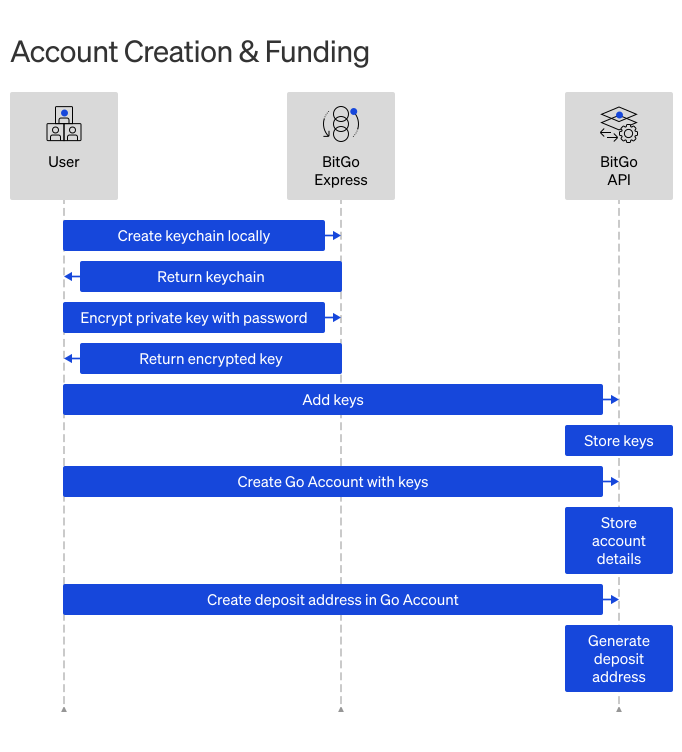
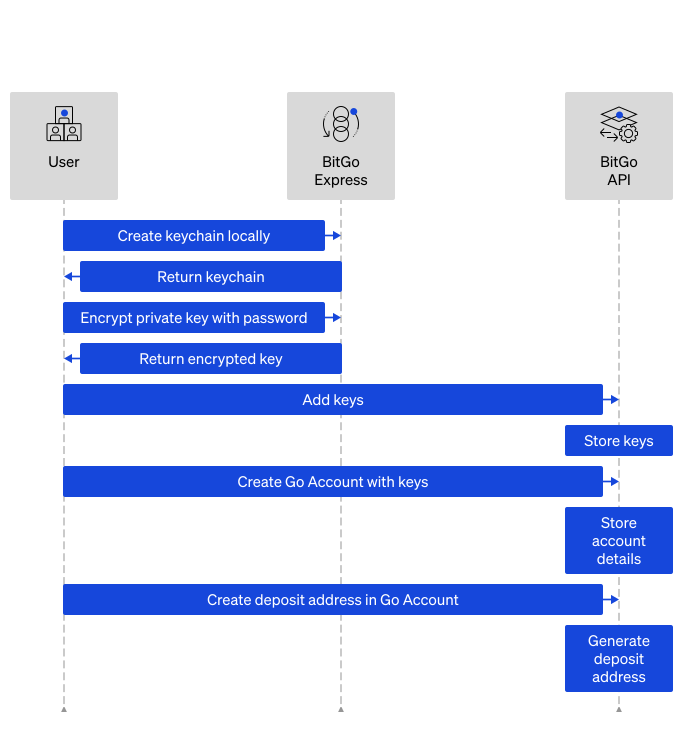
Creating Go Accounts for child enterprises is similar to creating other wallet types for your own enterprise. However, there are some key differences and steps, outlined below.
Prerequisites
Cookbooks
Need just the steps? Expand a cookbook below to get started:
Create Go Accounts (Automated)Open Cookbook Create Go Accounts (Manual)Open CookbookSteps
You can create the Go Account for your child enterprise in one of two ways. The automated approach leverages an all-in-one endpoint to generate and encrypt the keys, upload them to BitGo, and create the Go Account. If you want a more granular process, we recommend using the manual approach.
1. Generate Go Account
Endpoint: Generate Wallet
export BITGO_EXPRESS_HOST="<YOUR_LOCALHOST>"
export COIN="ofc"
export ACCESS_TOKEN="<SERVICE_USER_ACCESS_TOKEN>"
export LABEL="<YOUR_GO_ACCOUNT_NAME>"
export PASSPHRASE="<SERVICE_USER_LOGIN_PASSPHRASE>"
export CHILD_ENTERPRISE_ID="<CHILD_ENTERPRISE_ID>"
export PASSCODE="<YOUR_ENCRYPTION_CODE>"

curl -X POST \
  http://$BITGO_EXPRESS_HOST/api/v2/$COIN/wallet/generate \
  -H 'Content-Type: application/json' \
  -H "Authorization: Bearer $ACCESS_TOKEN" \
  -d '{
    "label": "'"$LABEL"'",
    "passphrase": "'"$PASSPHRASE"'",
    "enterprise": "'"$CHILD_ENTERPRISE_ID"'",
    "type": "trading", # Go Accounts are trading type BitGo wallets
    "passcodeEncryptionCode": "'"$PASSCODE"'" # Encrypts your wallet passphrase
}'
const { BitGo } = require('bitgo');

// Fill in with actual access token
const accessToken = '<SERVICE_USER_ACCESS_TOKEN>';

// Initialize the SDK
const bitgo = new BitGo({
  accessToken: accessToken,
  env: 'test',
});

// Generate Go Account
async function createGoAccount() {
  const goAccount = await bitgo.coin('ofc').wallets().generateWallet({
    label: '<YOUR_WALLET_NAME>',
    passphrase: '<SERVICE_USER_LOGIN_PASSPHRASE>',
    enterprise: '<CHILD_ENTERPRISE_ID>',
    type: 'trading', // Go Accounts are trading type BitGo wallets
    passcodeEncryptionCode: '<YOUR_ENCRYPTION_CODE>'
  });

  console.log(JSON.stringify(goAccount, null, 2));
}

createGoAccount();
Step Result
BitGo creates a Go Account wallet and returns the wallet data along with the single user keychain.
Note
Go Account creation is asynchronous. The API may return a successful response before the wallet is fully initialized. If you call the Create Address endpoint immediately after wallet creation, you may receive an intermittent error. BitGo recommends waiting up to 5 seconds or retrying with backoff before proceeding to the next step.
Warning
Ensure you back up the user keychain. It includes the pub and encryptedPrv keys, which aren't stored anywhere else.
{
    "wallet": {
        "id": "68f6f18b7af1db4904d979d0d2e5d822",
        "users": [
            {
                "user": "68728b8c66417fe09212fda389cc92c6",
                "permissions": [
                    "admin",
                    "spend",
                    "view",
                    "trade"
                ]
            }
        ],
        "coin": "ofc",
        "label": "your-child-enterprise-go-account",
        "m": 1,
        "n": 1,
        "keys": [
            "68f6f18b8b3ff242f952ceb03a7290a3"
        ],
        "keySignatures": {},
        "enterprise": "68f6abc2b621ab5c1c0b63e4d5da21a0",
        "organization": "68928b9066417fe09212fe9965c88552",
        "bitgoOrg": "BitGo Trust",
        "tags": [
            "68f6f18b7af1db4904d979d0d2e5d822",
            "68f6abc2b621ab5c1c0b63e4d5da21a0"
        ],
        "disableTransactionNotifications": false,
        "freeze": {},
        "deleted": false,
        "approvalsRequired": 1,
        "isCold": false,
        "coinSpecific": {
            "needsKeyReshareAfterPasswordReset": false,
            "pendingSystemInitialization": true,
            "features": ["multi-key-user-key"],
            "userKeySigningRequired": true
        },
        "admin": {
            "policy": {
                "date": "2025-10-21T02:35:55.000Z",
                "id": "68f6f18b7af1db4904d979d1b3c2e944",
                "label": "default",
                "rules": [
                    {
                        "id": "Offchain Wallet Whitelist",
                        "lockDate": "2125-10-21T02:35:55.000Z",
                        "mutabilityConstraint": "managed",
                        "type": "advancedWhitelist",
                        "action": {
                            "type": "deny",
                            "userIds": []
                        },
                        "condition": {
                            "entries": [
                                {
                                    "item": "68f6abc2b621ab5c1c0b63e4d5da21a0",
                                    "type": "enterpriseId",
                                    "metaData": {
                                        "whitelistDate": "2025-10-21T02:35:55.000Z"
                                    }
                                }
                            ]
                        }
                    }
                ],
                "version": 3,
                "latest": true
            }
        },
        "clientFlags": [],
        "walletFlags": [],
        "allowBackupKeySigning": false,
        "recoverable": true,
        "startDate": "2025-10-21T02:35:55.000Z",
        "type": "trading",
        "buildDefaults": {},
        "customChangeKeySignatures": {},
        "hasLargeNumberOfAddresses": false,
        "hasReceiveTransferPolicy": false,
        "creator": "68728b8c66417fe09211fda389cc48c6",
        "walletFullyCreated": true,
        "config": {},
        "pendingApprovals": []
    },
    "userKeychain": {
        "id": "68f6f18b8b3ff242f952ceb03a7290a3",
        "pub": "xpub661MyMwAqRbcEpSQ8LWmWrDbu3s36XPF3GbZ5MvJiMgDiKCsdmarRuJY6X4CT521BmDYfTmwc6MDazsdu8wBN6fNL9dsY1VzeRwkBvVmcXR",
        "ethAddress": "0x7efb44aeef5583ddc75fff533e27ae59f680d4a2",
        "source": "user",
        "type": "independent",
        "coinSpecific": {
            "ofc": {
                "features": ["multi-user-key"]
            }
        },
        "encryptedPrv": "{\"iv\":\"HdF9ZbsQnGmJKnxXzBHouh==\",\"v\":1,\"iter\":10000,\"ks\":256,\"ts\":64,\"mode\":\"ccm\",\"adata\":\"\",\"cipher\":\"aes\",\"salt\":\"FU5QOdz7p7h=\",\"ct\":\"8wKjkJ8Gh5L6AwmzdwEbjaPkO+IoaCDnjcQceFcbZ+PvkTHHH4v6rlbbHIwt6fdsXikrH6I3mhgHYgGf871xYFNjUkbyEAZ/xUPQEtk46G6w6/rH1S8ZXuxkJ/PTHhiKDIl5P+7dd1+KEO8BtLoJCiFlkZiMuP5=\"}"
    },
    "responseType": "GoAccountWalletWithUserKeychain",
    "warning": "Be sure to backup the user keychain -- it is not stored anywhere else!",
    "encryptedWalletPassphrase": "{\"iv\":\"wek1Ha/Po/aUAI/FnJCFtx==\",\"v\":1,\"iter\":10000,\"ks\":256,\"ts\":64,\"mode\":\"ccm\",\"adata\":\"\",\"cipher\":\"aes\",\"salt\":\"J37ZHREx7e9=\",\"ct\":\"px189Udy+8/joIi1EsYZRzuQS2C7j+p=\"}"
}
2. Create Receive Address
Endpoint: Create Address
export WALLET_ID="<YOUR_WALLET_ID>"
export ACCESS_TOKEN="<SERVICE_USER_ACCESS_TOKEN>"
export ON_TOKEN="<OFF-CHAIN_ASSET_ID>"

curl -X POST \
  "https://app.bitgo-test.com/api/v2/ofc/wallet/$WALLET_ID/address" \
  -H "Content-Type: application/json" \
  -H "Authorization: Bearer $ACCESS_TOKEN" \
  -d '{
    "onToken": "'"$ON_TOKEN"'" # For example, `ofctsol` for off-chain test Solana
  }'
const { BitGo } = require('bitgo');

// Fill in with actual access token
const accessToken = '<SERVICE_USER_ACCESS_TOKEN>';

// Initialize the SDK
const bitgo = new BitGo({
  accessToken: accessToken,
  env: 'custom',
  customRootURI: 'https://app.bitgo.com',
});

// Get Go Account
const walletId = '<GO_ACCOUNT_WALLET_ID>';
const wallet = await bitgo.coin('ofc').wallets().get({ id: walletId });

// Create address for specific token
const address = await wallet.createAddress({
  onToken: '<OFF-CHAIN_ASSET_ID>' // For example, 'ofctsol' for off-chain test Solana
});
console.log(JSON.stringify(address, null, 2));
Step Result
You created a new receive address for your Go Account for a specific asset.
{
  "id": "67ec59c0929b08484faecc752f542d8c",
  "address": "HNohgG7TsPkqBhWxxmbE1dRzuNrxSfFfdxuwxYwmMTxm",
  "chain": 0,
  "index": 397,
  "coin": "ofc",
  "token": "ofctsol",
  "wallet": "68f6f18b7af1db4904d979d0d2e5d822"
}
1. Create Keys
Create the public and private keys for your user's Go Account.
Endpoint: Create Key
export BITGO_EXPRESS_HOST="<YOUR_LOCAL_HOST>"
export ACCESS_TOKEN="<SERVICE_USER_ACCESS_TOKEN>"

curl -X POST \
  "http://$BITGO_EXPRESS_HOST/api/v2/ofc/keychain/local" \
  -H "Content-Type: application/json" \
  -H "Authorization: Bearer $ACCESS_TOKEN"
const BitGoJS = require('bitgo');
const bitgo = new BitGoJS.BitGo({ env: 'test' });

// Set your access token here
const accessToken = '<SERVICE_USER_ACCESS_TOKEN>';
// Go Accounts are offchain wallets, denoted by ofc
const coin = 'ofc';

bitgo.authenticateWithAccessToken({ accessToken });
const key = bitgo.coin(coin).keychains().create();
console.log(JSON.stringify(key, null, 2));
import org.bitcoinj.crypto.DeterministicKey;
import org.bitcoinj.crypto.HDKeyDerivation;
import java.security.SecureRandom;

public class GenerateKeychain {
    public static void main(String[] args) {
        System.out.println("=== Step 1: Generate Wallet/Keychain ===\n");

        // Generate 512-bit seed
        SecureRandom random = new SecureRandom();
        byte[] seed = new byte[64];
        random.nextBytes(seed);

        // Create BIP32 master key
        DeterministicKey masterKey = HDKeyDerivation.createMasterPrivateKey(seed);

        // Get Base58 encoded keys
        String xprv = masterKey.serializePrivB58(org.bitcoinj.params.MainNetParams.get());
        String xpub = masterKey.serializePubB58(org.bitcoinj.params.MainNetParams.get());

        System.out.println("Public Key (xpub):");
        System.out.println(xpub);
        System.out.println();
        System.out.println("Private Key (xprv):");
        System.out.println(xprv);
        System.out.println();
        System.out.println("✓ Save these values for Step 2 and wallet creation");
    }
}
Step Result
{
  "pub": "xpub661MyMwAqRbcEq5qQLciVPfCyCvx9KstKVp71TxujjY9Kbapv6o2YjtRAV1tfYgQZxBaN6FfFfE3CD21ZRSsd4WkqkFWSZDTiDqf49qtkh7",
  "prv": "xprv9s21ZrQH143K2M1NJK5i8FiURB6TjsA2xGtWD5ZJBQ1ASoFgNZUmzwZwKC9WnyRaN2f4uAdHPdMmLbw2SsUKa6J2bWUEWihbMKcrhJSZueH"
}
2. Encrypt Keys
Use your BitGo login password to encrypt the private key, prv, that you created in the prior step.
Endpoint: Encrypt Messages
export BITGO_EXPRESS_HOST="<YOUR_LOCAL_HOST>"
export ACCESS_TOKEN="<SERVICE_USER_ACCESS_TOKEN>"
export INPUT="<PRV_KEY>"
export PASSWORD="<YOUR_BITGO_LOGIN_PASSWORD>"

curl -X POST \
  "http://$BITGO_EXPRESS_HOST/api/v2/encrypt" \
  -H "Content-Type: application/json" \
  -H "Authorization: Bearer $ACCESS_TOKEN" \
  -d '{
    "input": "'"$INPUT"'",
    "password": "'"$PASSWORD"'"
}'
const BitGoJS = require('bitgo');
const bitgo = new BitGoJS.BitGo({ env: 'test' });

const passphrase = '<YOUR_BITGO_LOGIN_PASSWORD>';
const privateKey = '<PRV_KEY_FROM_STEP_1>';

// Encrypt the private key with your passphrase
const encryptedPrv = bitgo.encrypt({
  password: passphrase,
  input: privateKey
});
import javax.crypto.*;
import javax.crypto.spec.*;
import java.security.*;
import java.security.spec.*;
import java.util.*;
import com.google.gson.*;

public class EncryptPrivateKey {
    public static void main(String[] args) throws Exception {
        System.out.println("=== Step 2: Encrypt Private Key ===\n");

        // Configuration - replace with your values
        String passphrase = "your_wallet_passphrase";
        String privateKey = "xprv..."; // From Step 1

        // Generate salt and IV
        SecureRandom random = new SecureRandom();
        byte[] salt = new byte[8];
        byte[] iv = new byte[16];
        random.nextBytes(salt);
        random.nextBytes(iv);

        // Derive key using PBKDF2
        int iterations = 10000;
        int keySize = 256;
        SecretKeyFactory factory = SecretKeyFactory.getInstance("PBKDF2WithHmacSHA256");
        KeySpec spec = new PBEKeySpec(passphrase.toCharArray(), salt, iterations, keySize);
        SecretKey tmp = factory.generateSecret(spec);
        SecretKeySpec secretKey = new SecretKeySpec(tmp.getEncoded(), "AES");

        // Encrypt with AES-GCM
        Cipher cipher = Cipher.getInstance("AES/GCM/NoPadding");
        GCMParameterSpec gcmSpec = new GCMParameterSpec(128, iv); // 128-bit auth tag
        cipher.init(Cipher.ENCRYPT_MODE, secretKey, gcmSpec);
        byte[] ciphertext = cipher.doFinal(privateKey.getBytes("UTF-8"));

        // Build SJCL JSON
        JsonObject json = new JsonObject();
        json.addProperty("iv", Base64.getEncoder().encodeToString(iv));
        json.addProperty("v", "1");
        json.addProperty("iter", iterations);
        json.addProperty("ks", keySize);
        json.addProperty("ts", 128);
        json.addProperty("mode", "gcm");
        json.addProperty("adata", "");
        json.addProperty("cipher", "aes");
        json.addProperty("salt", Base64.getEncoder().encodeToString(salt));
        json.addProperty("ct", Base64.getEncoder().encodeToString(ciphertext));

        // Convert to JSON string (disable HTML escaping for clean output)
        Gson gson = new GsonBuilder().disableHtmlEscaping().create();
        String jsonString = gson.toJson(json);

        // Escape for use in JSON/curl (replace " with \")
        String escapedJson = jsonString.replace("\"", "\\\"");

        System.out.println("Encrypted Private Key:");
        System.out.println(escapedJson);
        System.out.println();
        System.out.println("✓ Use this encrypted key when creating your wallet via REST API");
    }
}
Step Result
{
  "encrypted": "{\"iv\":\"aHbrsJVbtqlW3+8XWiy8hg==\",\"v\":1,\"iter\":10000,\"ks\":256,\"ts\":64,\"mode\":\"ccm\",\"adata\":\"\",\"cipher\":\"aes\",\"salt\":\"LxyG+VtiNVc=\",\"ct\":\"kMGJQNpRXWEq8E12vgFkLe6/1pg9pqZCZnxuXPHosQjx9jhYWe4XBCNF684m3ncwZ69qlqP5QmK8kObSoTkZP7SF2gaQugyJl+4/hgVj3Bx5QDGyiMwE/8owaJpR5CtRVkNXvXIciKL4UJ8isE9mRDfObku7VQQ=\"}"
}
3. Upload Keys
Upload to BitGo the public key, xpub, you created in Step 1 and the encrypted private key, encryptedPrv, you created in Step 2.
Endpoint: Create Key
export ACCESS_TOKEN="<SERVICE_USER_ACCESS_TOKEN>"

curl -X POST \
  "https://app.bitgo-test.com/api/v2/ofc/key" \
  -H "Content-Type: application/json" \
  -H "Authorization: Bearer $ACCESS_TOKEN" \
  -d '{
    "encryptedPrv": "{\"iv\":\"aHbrsJVbtqlW3+8XWiy8hg==\",\"v\":1,\"iter\":10000,\"ks\":256,\"ts\":64,\"mode\":\"ccm\",\"adata\":\"\",\"cipher\":\"aes\",\"salt\":\"LxyG+VtiNVc=\",\"ct\":\"kMGJQNpRXWEq8E12vgFkLe6/1pg9pqZCZnxuXPHosQjx9jhYWe4XBCNF684m3ncwZ69qlqP5QmK8kObSoTkZP7SF2gaQugyJl+4/hgVj3Bx5QDGyiMwE/8owaJpR5CtRVkNXvXIciKL4UJ8isE9mRDfObku7VQQ=\"}",
    "source": "user",
    "originalPasscodeEncryptionCode": "anim",
    "pub": "xpub661MyMwAqRbcFiU9xs5UzYPhgSnx4s55pSeB5FKgLAXG8xn8kdZCfbZ5fLSf8NpntDLjGcQW4oR1xiNMc21bLHbvBzPdsVy75JkRxEqtT6E"
}'
const BitGoJS = require('bitgo');
const bitgo = new BitGoJS.BitGo({ env: 'test' });

// Set your access token
const accessToken = '<SERVICE_USER_ACCESS_TOKEN>';
bitgo.authenticateWithAccessToken({ accessToken });

const coin = 'ofc';
const publicKey = '<PUB_KEY_FROM_STEP_1>';
const encryptedPrivateKey = '<ENCRYPTED_PRV_FROM_STEP_2>';
const enterpriseId = '<CHILD_ENTERPRISE_ID>';
const passcodeEncryptionCode = '<YOUR_ENCRYPTION_CODE>';

// Add keychain to BitGo
const keychainParams = {
  pub: publicKey,
  encryptedPrv: encryptedPrivateKey,
  originalPasscodeEncryptionCode: passcodeEncryptionCode,
  source: 'user',
  enterprise: enterpriseId,
};

const addedKeychain = await bitgo.coin(coin).keychains().add(keychainParams);
console.log(JSON.stringify(addedKeychain, null, 2));
Step Result
You receive a key ID, id, that you must pass in the next step.
{
  "id": "63ee42c723f584000746d0057a2fb075",
  "pub": "xpub661MyMwAqRbcFiU9xs5UzYPhgSnx4s55pSeB5FKgLAXG8xn8kdZCfbZ5fLSf8NpntDLjGcQW4oR1xiNMc21bLHbvBzPdsVy75JkRxEqtT6E",
  "ethAddress": "0x098a57ddc2ce053bd73dd4d6f7f71004be082b4f",
  "source": "user",
  "type": "independent",
  "coinSpecific": {
    "ofc": {
      "features": ["multi-user-key"]
    }
  },
  "encryptedPrv": "{\"iv\":\"aHbrsJVbtqlW3+8XWiy8hg==\",\"v\":1,\"iter\":10000,\"ks\":256,\"ts\":64,\"mode\":\"ccm\",\"adata\":\"\",\"cipher\":\"aes\",\"salt\":\"LxyG+VtiNVc=\",\"ct\":\"kMGJQNpRXWEq8E12vgFkLe6/1pg9pqZCZnxuXPHosQjx9jhYWe4XBCNF684m3ncwZ69qlqP5QmK8kObSoTkZP7SF2gaQugyJl+4/hgVj3Bx5QDGyiMwE/8owaJpR5CtRVkNXvXIciKL4UJ8isE9mRDfObku7VQQ=\"}"
}
4. Create Go Account
Endpoint: Add Wallet
export ACCESS_TOKEN="<SERVICE_USER_ACCESS_TOKEN>"
export LABEL="<YOUR_WALLET_NAME>"
export ENTERPRISE_ID="<YOUR_ENTERPRISE_ID>"
export KEYS="<KEY_ID>"

curl -X POST \
  "https://app.bitgo-test.com/api/v2/ofc/wallet/add" \
  -H "Content-Type: application/json" \
  -H "Authorization: Bearer $ACCESS_TOKEN" \
  -d '{
    "label": "'"$LABEL"'",
    "enterprise": "'"$ENTERPRISE_ID"'",
    "type": "trading",
    "m": 1,
    "n": 1,
    "keys": ["'"$KEYS"'"]
}'
const BitGoJS = require('bitgo');
const bitgo = new BitGoJS.BitGo({ env: 'test' });

// Set your access token
const accessToken = '<SERVICE_USER_ACCESS_TOKEN>';
bitgo.authenticateWithAccessToken({ accessToken });

const coin = 'ofc';
const keychainId = '<KEYCHAIN_ID_FROM_STEP_3>';
const walletLabel = '<YOUR_WALLET_NAME>';
const enterpriseId = '<CHILD_ENTERPRISE_ID>';

// Create Go Account wallet
const walletParams = {
  label: walletLabel,
  m: 1,
  n: 1,
  keys: [keychainId],
  type: 'trading', // Required for Go Accounts
  enterprise: enterpriseId,
};

const walletResponse = await bitgo.coin(coin).wallets().add(walletParams);
console.log(JSON.stringify(walletResponse, null, 2));
Step Result
You created a Go Account for your user's child enterprise.
Note
Go Account creation is asynchronous. The API may return a successful response before the wallet is fully initialized. If you call the Create Address endpoint immediately after wallet creation, you may receive an intermittent error. BitGo recommends awaiting up to 5 seconds or retrying with backoff before proceeding to the next step.
{
    "id": "62e18ee98b38310008a830927220dfdc",
    "users": [
        {
            "user": "62ab90e06dfda30007974f0a52a12995",
            "permissions": [
                "admin",
                "view",
                "spend",
                "trade"
            ]
        }
    ],
    "coin": "ofc",
    "label": "My Go Account",
    "m": 1,
    "n": 1,
    "keys": ["63ee42c723f584000746d0057a2fb075"],
    "keySignatures": {},
    "enterprise": "60e6229d19d3c400068bde7da6d41b6f",
    "organization": "60e6229d19d3c400068bde7ded2f3bac",
    "bitgoOrg": "BitGo Trust",
    "tags": [
        "62e18ee98b38310008a830927220dfdc",
        "62c5ae8174ac860007aff138a2d74df7"
    ],
    "disableTransactionNotifications": false,
    "freeze": {},
    "deleted": false,
    "approvalsRequired": 1,
    "isCold": false,
    "coinSpecific": {
        "needsKeyReshareAfterPasswordReset": false,
        "pendingSystemInitialization": true,
        "features": ["multi-key-user-key"],
        "userKeySigningRequired": true
    },
    "admin": {
        "policy": {
            "date": "2025-04-02T19:15:53.000Z",
            "id": "62e18ee98b38310008a8309321b4f9c1",
            "label": "default",
            "rules": [
                {
                    "id": "Offchain Wallet Whitelist",
                    "lockDate": "2125-04-02T19:15:53.000Z",
                    "mutabilityConstraint": "managed",
                    "type": "advancedWhitelist",
                    "action": {
                        "type": "deny",
                        "userIds": []
                    },
                    "condition": {
                        "entries": [
                            {
                                "item": "60e6229d19d3c400068bde7da6d41b6f",
                                "type": "enterpriseId",
                                "metaData": {
                                    "whitelistDate": "2025-04-02T19:15:53.000Z"
                                }
                            }
                        ]
                    }
                }
            ],
            "version": 3,
            "latest": true
        }
    },
    "clientFlags": [],
    "walletFlags": [],
    "allowBackupKeySigning": false,
    "recoverable": true,
    "startDate": "2025-04-02T19:15:53.000Z",
    "type": "trading",
    "buildDefaults": {},
    "customChangeKeySignatures": {},
    "hasLargeNumberOfAddresses": false,
    "hasReceiveTransferPolicy": false,
    "creator": "62ab90e06dfda30007974f0a52a12995",
    "walletFullyCreated": true,
    "config": {},
    "pendingApprovals": []
}
5. Create Receive Address
Endpoint: Create Address
export WALLET_ID="<YOUR_WALLET_ID>"
export ACCESS_TOKEN="<SERVICE_USER_ACCESS_TOKEN>"
export ON_TOKEN="<OFF-CHAIN_ASSET_ID>"

curl -X POST \
  "https://app.bitgo-test.com/api/v2/ofc/wallet/$WALLET_ID/address" \
  -H "Content-Type: application/json" \
  -H "Authorization: Bearer $ACCESS_TOKEN" \
  -d '{
    "onToken": "'"$ON_TOKEN"'" # For example, `ofctsol` for off-chain test Solana
  }'
const { BitGo } = require('bitgo');

// Fill in with actual access token
const accessToken = '<SERVICE_USER_ACCESS_TOKEN>';

// Initialize the SDK
const bitgo = new BitGo({
  accessToken: accessToken,
  env: 'custom',
  customRootURI: 'https://app.bitgo.com',
});

// Get Go Account
const walletId = '<GO_ACCOUNT_WALLET_ID>';
const wallet = await bitgo.coin('ofc').wallets().get({ id: walletId });

// Create address for specific token
const address = await wallet.createAddress({
  onToken: '<OFF-CHAIN_ASSET_ID>' // For example, 'ofctsol' for off-chain test Solana
});
console.log(JSON.stringify(address, null, 2));
Step Result
You created a new receive address for your Go Account for a specific asset.
{
  "id": "67ec59c0929b08484faecc752f542d8c",
  "address": "HNohgG7TsPkqBhWxxmbE1dRzuNrxSfFfdxuwxYwmMTxm",
  "chain": 0,
  "index": 397,
  "coin": "ofc",
  "token": "ofctsol",
  "wallet": "62e18ee98b38310008a830927220dfdc"
}
Next Steps
Enable your users to deposit assets into their Go Account, place trade orders, and withdraw their assets:
- Deposit Assets
- Place Trade Orders
- Withdraw from Go Account (Manual) or Withdraw from Go Account (Simple)