

Crypto-as-a-Service
Crypto-as-a-Service Overview
Overview
Crypto-as-a-Service (CaaS) is a customizable B2B2C solution that you can use to operate a crypto financial ecosystem securely and efficiently. Once you integrate, you can offer your users comprehensive crypto and fiat capabilities, including holding, buying, selling, and trading assets. You maintain complete control over your branding and user experience. BitGo handles all the underlying crypto and fiat infrastructure, as well as the regulatory and compliance requirements.
To provision a CaaS testnet prospect environment, create an account with one of these links:
You can download the BitGo CaaS Postman Collection and import it into Postman to quickly explore and test the CaaS APIs.
CaaS Features
| Category | Description |
|---|---|
| Onboarding | Onboard new users to your platform, including Know Your Customer (KYC) or Know Your Business (KYB) checks and sanctions screenings. |
| On Ramps | Collect your users' banking information and submit it to BitGo on their behalf. |
| Custody | BitGo serves as a regulated custodian for your users' accounts, providing complete wallet infrastructure for both fiat and digital assets. |
| User Management | Manage your users' accounts programmatically or through a lightweight web UI, including viewing select details, such as balances and deposit addresses. |
| Transactions | You and your users can initiate transactions, such as buys, sells, trades, and withdrawals. |
| Off Ramps | Your users can transfer fiat to their bank accounts and digital assets to other wallets. |
By default, all enterprises have the ability to create Go Accounts, trade, stake, and create segregated wallets. You don't have to use all of these products for a CaaS integration. However, they're all available to you as soon as you create an enterprise.
Note
Security and compliance are critically important. BitGo recommends that you also perform your own KYC checks and fraud-prevention verifications.
BitGo Hierarchy
To understand CaaS, it's important to understand the hierarchical model that BitGo uses:
-
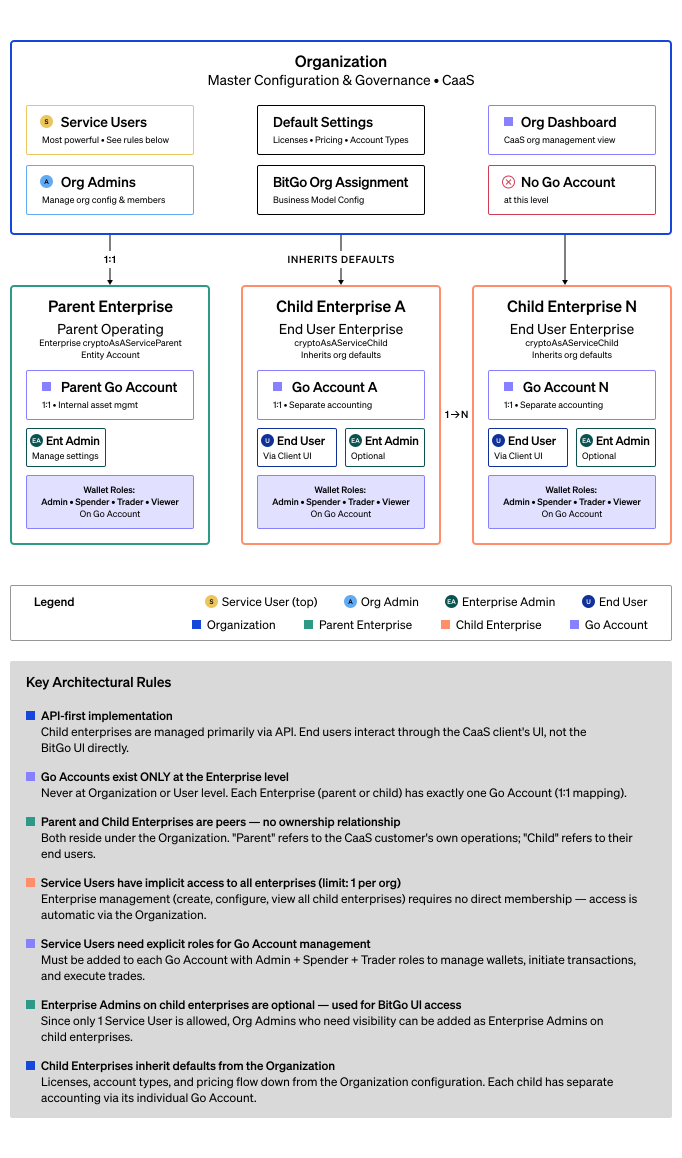
Organization: The top level of the hierarchy, representing your main business entity. Organizations can create and manage an unlimited number of enterprises (one-to-many relationship). You can create org-level webhooks. However, policies are limited to the enterprise and wallet levels.
-
Enterprise: The mid level of the hierarchy, residing within a single organization (1-to-1 relationship). In CaaS, an enterprise represents your end users, either individuals or other businesses. Each enterprise operates independently with its own access controls, user permissions, and transaction policies. Each enterprise has a single Go Account for handling all digital asset and fiat activities.
-
Go Account: Within each enterprise is a single Go Account (1-to-1 relationship). The Go Account is the core financial account from which your clients conduct all their transactions. Go Accounts enable your end users to hold fiat and digital assets, execute trades, process settlements, and access liquidity providers. To learn more about Go Accounts and other wallet types, see BitGo Wallet Types.
-
User Account: The bottom level of the hierarchy. Users represent individuals and can belong to one or more enterprises. For your end users, this is typically a 1-to-1 relationship with an enterprise. For you and your admins, it's typically 1-to-many.
Key Roles
CaaS uses two distinct roles: the organization admin and the service user. Although the same person may manage both - they serve different purposes and have different levels of access.
| Organization Admin | Service User | |
|---|---|---|
| What is it? | A person you select from your enterprise admins. | A user account that acts on behalf of your platform through the API. |
| Child enterprise access | No. | Automatically added to child enterprises. |
| Capabilities | View balances and KYC statuses across child enterprises, create org-level webhooks, add or remove users, and assign roles. | Create child enterprises, create Go Accounts, activate wallets, execute trades, initiate withdrawals, and manage day-to-day operations within child enterprises. |
| Limitations | Can't create or manage child enterprises, Go Accounts, wallets, transactions, whitelists, or receive addresses. | Can't create org-level webhooks, add or remove enterprise users, or assign enterprise roles. |
| Can transact? | No. | Yes, can initiate withdrawals, trades, and other actions. |
| Identity verification | Doesn't submit KYC or KYB for your end users. | Submits KYC and KYB information and initiates identity verification on behalf of your end users. |
How It Works
Set Up Your Business
Set up and register your main business entity within BitGo by creating a BitGo account. Upon completion, BitGo creates the following for you:
- User account with a unique ID.
- Enterprise with a unique ID.
- Organization with a unique ID.
Once you have an enterprise, you can add other members from your business to it and assign them as organization admins.
Onboard Your End Users
Once you set up your organization, you can create enterprises for your end users, each with their own Go Account. The Go Account provides a single wallet for all assets, including fiat. To distinguish between your enterprise and those of your users, BitGo refers to their enterprises as child enterprises.
When you create a child enterprise, the service user automatically gets admin access to it. The service user creates your users' Go Accounts and submits trade instructions to BitGo through the API.
Before your end users can use BitGo products on your platform, you must verify their identities using Know Your Customer (KYC) or Know Your Business (KYB) verification, depending on your use case.
Example Use Case
A trading broker wants to provide crypto trading services using CaaS from BitGo. They structure their integration as follows:
- Organization: The trading firm itself. Everyone at the firm has a BitGo account and is a member of an enterprise within the firm organization.
- Enterprise: Each client, trader, or trading group has their own enterprise within the organization.
- Go Account: Each client, trader, or trading group has a Go Account in their enterprise that they can use to execute trades and manage funds.
- User Account: Every individual person has a BitGo user account and is a member of at least one enterprise.
Prerequisites
Steps
- Set Up Organization
- Set Up Child Enterprises
- Complete KYC Verification or Complete KYB Verification
- Create Go Accounts
- Create Policies
Next Steps
Once you create Go Accounts for your users, follow the integration guides below to enable buying, selling, trading, and withdrawing digital assets.