

Partner
OES Partner Overview
Overview
With Off-Exchange Settlement, mutual clients store assets at BitGo Bank & Trust. Clients allocate assets to you for trading, and BitGo works with your platform to facilitate the settlement of client assets. This model mitigates the need for on-chain transfers.
You can download the BitGo OES Partner Postman Collection and import it into Postman. Use Postman to quickly explore and test the OES partner APIs.
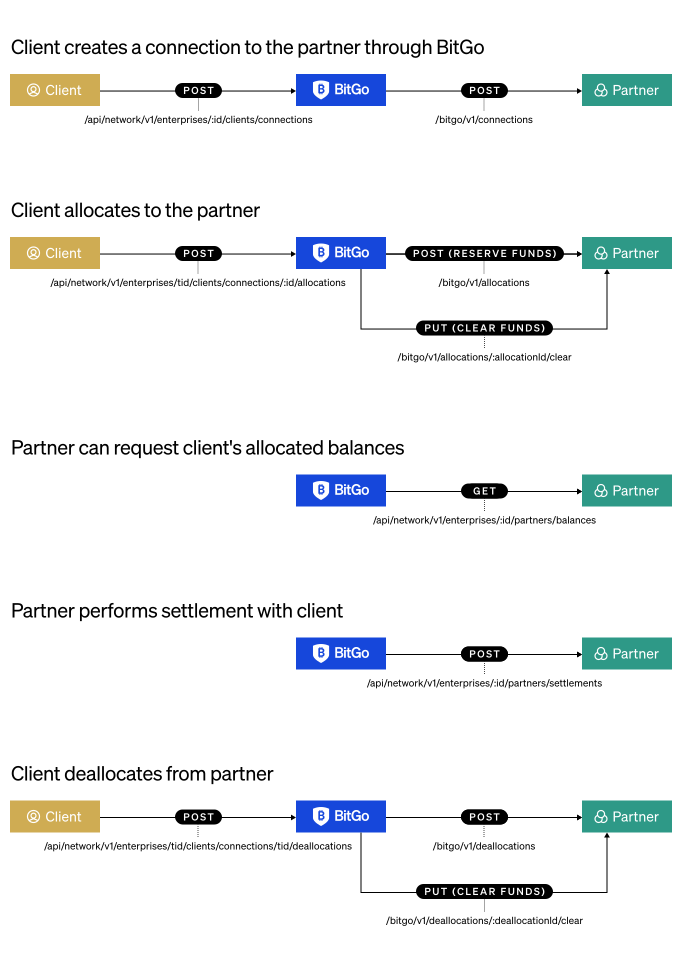
To offer Off-Exchange Settlement with BitGo you must complete the integration process. The integration process consists of the following major milestones:
- Build out core API functionality:
- Complete settlement reconciliation
- Deploy and automate at scale
BitGo provides access to a test environment and works with you during design, end-to-end testing and production deployment. Contact BitGo to become a Partner.
Prerequisites
- Get Started - Ensure your access token has the following permissions:
Settlement Network - ReadSettlement Network - Write
- Set Up BitGo Express
- Deposit Assets
- Sign a BitGo Network license. To learn more, contact sales@bitgo.com.
Partner Hosted APIs
To integrate Off-Exchange Settlement, you need to create your own set of endpoints to communicate with BitGo.
The following are the default partner-hosted endpoints that BitGo recommends:
POST /bitgo/v1/connections- BitGo alerts you about the new connection and confirms that the account on your platform is a settlement network account.POST /bitgo/v1/allocations- BitGo creates a new reserved allocation if no allocation exists.POST /bitgo/v1/deallocations- BitGo creates a new reserved deallocation if no deallocation exists.PUT /bitgo/v1/allocation/{allocationId}/clear- BitGo sends aPUTrequest to this endpoint notifying you of a successful operation and that it is now safe to add a credit to the users account and allow them to trade with it.PUT /bitgo/v1/deallocation/{deallocationId}/clear- BitGo sends aPUTrequest to this endpoint notifying you of a successful operation and that it is now safe to debit the held assets from the user account.PUT /bitgo/v1/allocation/{allocationId}/release- In the event of a continually unsuccessful or unrecoverable operation on the BitGo side, BitGo sends aPUTrequest to this endpoint notifying you of the cancellation operation. This instructs you to unlock any assets that your platform may hold locked and to cancel the credit to the user account.PUT /bitgo/v1/deallocation/{deallocationId}/release- In the event of a continually unsuccessful or unrecoverable operation on the BitGo side, BitGo sends aPUTrequest to this endpoint notifying you of the cancellation operation. This instructs you to unlock any assets that your platform may hold locked and to cancel the hold on the user account.GET /bitgo/v1/allocation/{allocationId}- BitGo uses this endpoint for auditing and admin operations.
Note
BitGo recommends integrating these default endpoints, but can accommodate others if needed. If your use case requires a more custom integration, contact your Customer Success Manager (CSM) or sales@bitgo.com.