
Custody Starter Architecture Overview
Overview
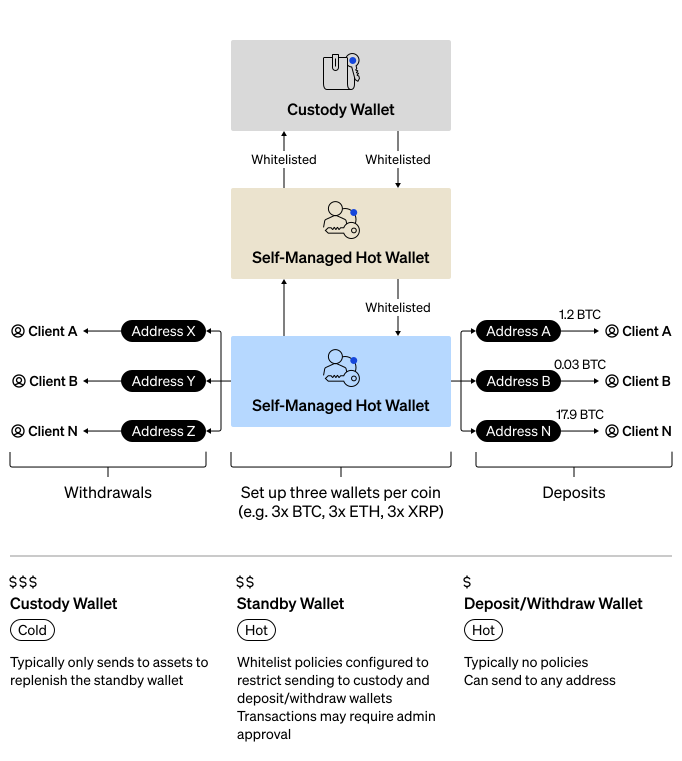
Custody starter architecture is the recommended integration pattern for individual enterprises that want to maximize security while maintaining operational flexibility. This architecture uses a three-wallet structure per coin that balances security requirements with day-to-day operational needs. If your use cases requires multiple enterprises, see Crypto-as-a-Service (CaaS).
This guide walks you through setting up the following:
- Custody wallet - A qualified custody cold wallet where you keep majority of your assets. This wallet has the strictest security protocols that govern the movement of assets between it and the standby wallet.
- Standby wallet - A self-custody wallet for intermediate funds. This wallet contains a smaller balance than your custody wallet and has less strict policies to enable more flexibility.
- Deposit/withdraw wallet - A second self-custody wallet for daily operations. This wallet contains the smallest balance of the three wallets and it has the most freedom and flexibility, enabling small withdraws without approvals.
- Whitelists - The policies that govern the movement of assets between the three wallets.
- Receive Addresses - Unique receive address on the deposit/withdraw wallet for everyone in your enterprise.
You can download the Postman Collection and import it into Postman to quickly explore and test the APIs.
Wallet Roles
| Wallet | Type | Balance | Policies | Purpose |
|---|---|---|---|---|
| Custody Wallet | Custody cold | Majority of assets | Strictest: admin approvals, velocity limits, whitelist | Long-term secure storage. |
| Standby Wallet | Self-Custody | Intermediate amount | Admin approval for withdrawals, whitelist | Buffer between cold storage and operations. |
| Deposit/Withdraw Wallet | Self-Custody | Smallest amount | None | Day-to-day customer transactions. |
Fund Flow
- Deposits: Wallets outside of your enterprise can deposit into the deposit/withdraw wallet.
- Accumulation: Periodically move accumulated assets from the deposit/withdraw wallet to the standby wallet.
- Cold Storage: Move excess funds from the standby wallet to the custody wallet for more secure storage.
- Withdrawals: People in your enterprise can withdrawal to wallets outside of your enterprise using the deposit/withdraw wallet.
- Replenishment: When the deposit/withdraw wallet runs low, replenish from the standby wallet.
- Major Replenishment: When the standby wallet runs low, replenish from the custody wallet.
Security Benefits
- Limited Exposure: Only a small portion of assets are in the most accessible wallet.
- Layered Security: Multiple approval checkpoints before accessing cold storage.
- Whitelist Restrictions: Funds can only move between designated wallets.
- Audit Trail: All fund movements require explicit authorization.
Policy Recommendations
| Wallet | Recommended Policies |
|---|---|
| Custody Wallet | Require multiple admin approvals, velocity limits (e.g., max withdrawal per day), whitelist to standby wallet only. |
| Standby Wallet | May require admin approval for withdrawals, whitelist to custody and deposit/withdraw wallets only. |
| Deposit/Withdraw Wallet | No policies (or minimal), allows spenders to withdraw freely for daily operations. |
Prerequisites
- Get Started
- Understand BitGo Wallet Types
Steps
Set up your custody starter architecture by following these guides:
- Set Up Custody Wallet - Set up your cold storage wallet.
- Set Up Standby Wallet - Set up your intermediate hot wallet.
- Create Whitelists - Configure whitelist policies between wallets.
- Set Up Deposit/Withdraw Wallet - Set up your operational hot wallet.
- Create Receive Addresses - Create addresses for individuals in your enterprise.