# Burn Stablecoins
Source: https://developers.bitgo.com/docs/stablecoins-redeem
## Overview
Burning is the process of permanently removing stablecoin tokens from circulation in exchange for fiat currency. Each burn order reduces the total token supply by an amount equal to the redeemed value, preserving the 1:1 relationship between issued tokens and backing reserves.
You can redeem your stable coins for fiat currency by submitting a burn order request from your Go Account. Once you initiate a burn order request, BitGo validates the transaction on-chain, following successful decommissioning of the tokens. The corresponding fiat currency deposits into your Go Account balance.
All burn orders are subject to validation, authorization, and reconciliation controls to ensure that token supplies and reserve balances remain aligned throughout the redemption process.
## Prerequisites
* [Stablecoin Overview](docs/stablecoins-overview)
## Burn Order Lifecycle
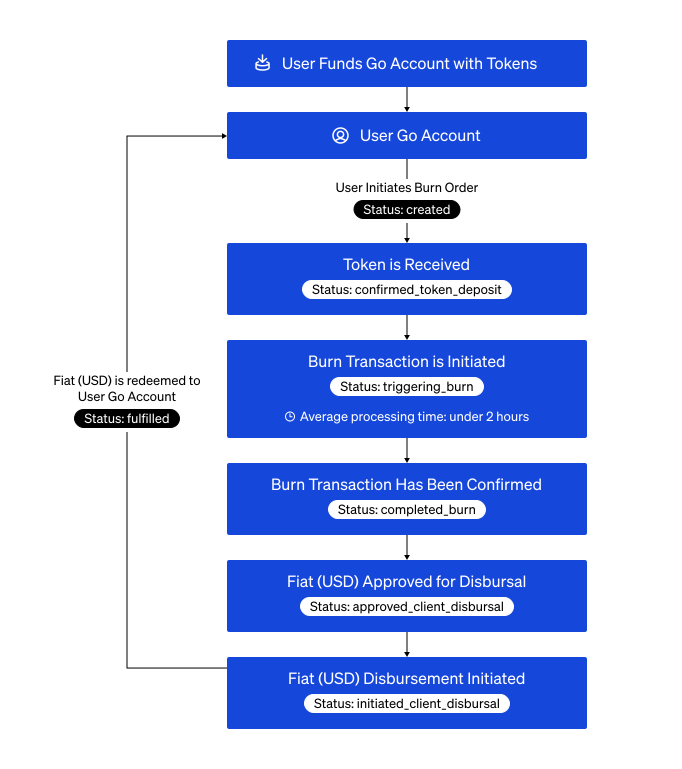
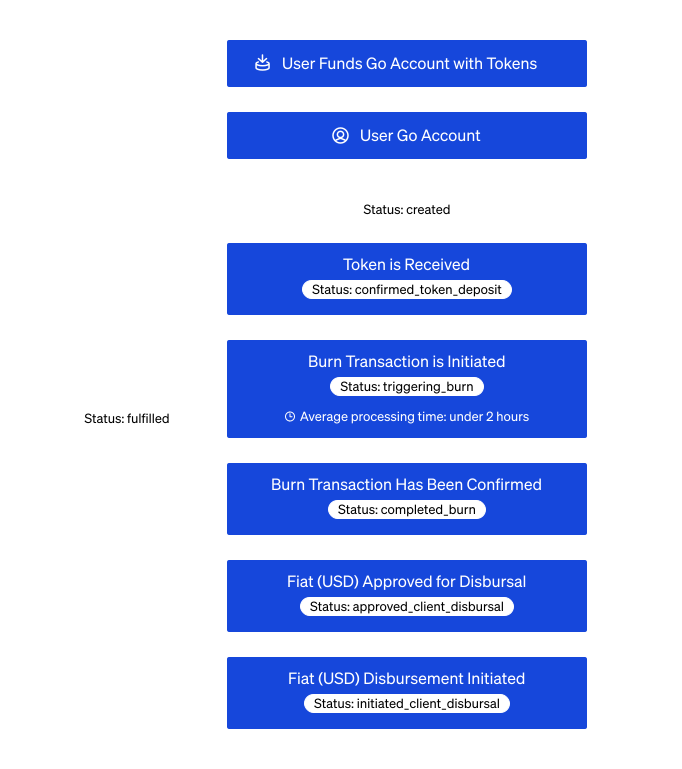
A burn order lifecycle tracks your request from the initial stablecoin deposit to the delivery of fiat currency in your Go Account. The diagram below provides a high-level overview of the stages a burn order progresses through from initiation to final fulfillment.
 >📘 **Note**
>
> Your burn order requests go into processing and are `fulfilled` on average under two hours. However, burn orders of high-value increase processing time.
## Burn Status Lifecycle
| Status | Description |
| :------- | :---------- |
| `created` | Initial state when a burn order is first submitted. Waiting to fund burn order with tokens. |
| `confirmed_token_deposit` | Token deposit is successfully verified in the designated burn address. |
| `triggering_burn` | Burn order is currently initiating the blockchain transaction to destroy the tokens. |
| `completed_burn` | Tokens permanently removed from circulation on-chain. |
| `approved_client_disbursal` | Fiat payout approved and authorized. |
| `initiated_client_disbursal` | Fiat payout transfer initiated. |
| `fulfilled` | Fiat is successfully disbursed and the redemption is complete. |
| `failed_burn_transaction` | An error occurred while attempting to initiate the burn order. |
| `failed_to_burn` | The blockchain burn transaction failed or rejected. |
| `failed_to_initiate_disbursal` | An error occurred while trying to process the fiat payout. |
| `failed_to_complete_disbursal` | The fiat payment processed but failed to complete. |
## Cookbook
Need just the steps? Expand the cookbook below to get started:
## 1. List Available Stablecoins
View a comprehensive list of all stablecoins available for burning.
>Endpoint: [List Supported Stablecoins](/reference/stablecoinv1assetsget)
```shell cURL
export BITGO_ENV="test" # or "prod" for production
export ACCESS_TOKEN=""
curl -X GET \
https://app.bitgo-$BITGO_ENV.com/api/stablecoin/v1/assets \
-H 'Content-Type: application/json' \
-H "Authorization: Bearer $ACCESS_TOKEN"
```
```js JavaScript
import * as BitGoJS from 'bitgo';
import { common } from '@bitgo/sdk-core';
require('dotenv').config({ path: '../../../.env' });
// Configuration
const accessToken = '';
const enterpriseId = '';
const walletId = '';
const walletPassphrase = '';
const bitgo = new BitGoJS.BitGo({ env: 'test' });
bitgo.authenticateWithAccessToken({ accessToken });
const baseUrl = common.Environments[bitgo.getEnv()].uri + '/api/stablecoin/v1';
async function main() {
// Step 1: Fetch assets to get IDs and treasury wallet
const assets = (await bitgo.get(`${baseUrl}/assets`)).body;
const usdAsset = assets.find((a: any) => a.token === 'tfiatusd');
const stablecoinAsset = assets.find((a: any) => a.token === 'tbsc:usd1');
const treasuryWalletId = stablecoinAsset.treasuryAccountWalletId;
```
#### Step Result
You receive `treasuryAccountWalletId` values. Save this for use in the following step.
```json JSON
[
{
"id": "08c1271e-b15d-4af8-8929-f75383903da4",
"token": "tfiatusd",
"name": "Testnet US Dollar",
"decimals": 2,
},
{
"id": "bfd0daec-f849-4b96-bdb6-6373bffeb9b6",
"token": "tbsc:usd1",
"name": "Testnet BSC USD1",
"decimals": 18,
"chain": "tbsc",
"backingAsset": "tfiatusd",
"treasuryAccountWalletId": "67c1a025f9999f485f7a71aa26a1da4c"
},
{
"id": "49ff49ea-3355-4717-bbb0-5e8f5cae2202",
"token": "hteth:gousd",
"name": "Testnet goUSD",
"decimals": 6,
"chain": "hteth",
"backingAsset": "tfiatusd",
"treasuryAccountWalletId": "6698e670115059e2efe672436a3aea3b"
}
]
```
## 2. Get Treasury Wallet ID
Locate the `treasuryAccountWalletId` field within the stablecoin asset object returned by the [List Supported Stablecoins](/reference/stablecoinv1assetsget). This UUID represents the destination treasury wallet required for the redeem requests.
## 3. Calculate Redeem Amount
When initiating a redemption, the amount of stablecoins to be burned must be expressed in the token's native **Base Units**. Because stablecoins typically utilize higher precision (6 or 18 decimals), the resulting integer will be significantly larger.
**Formula:**
Base Units = Amount * 10Decimals
**Example (Stablecoin):**
A redemption of 100 stablecoin tokens occurs for an asset with 6 decimals:
* Amount: 100
* Decimals: 6
* Calculation: 100 * 10⁶ = 100,000,000
* Result: 100,000,000 base units
```shell
# Calculate programmatically
DECIMALS=6 # From assets API response for stablecoin
AMOUNT_BASE_UNITS=$(($AMOUNT_IN_FULL_UNITS * 10**$DECIMALS))
echo "Amount in base units: $AMOUNT_BASE_UNITS"
```
```js JavaScript
const fromAmount = (100 * Math.pow(10, stablecoinAsset.decimals)).toString(); // 100 stablecoin in base units
```
## 4. Create Burn Order
By submitting a burn order, you are creating a "Pending" record that BitGo uses to track the movement of stablecoin tokens for fiat currency.
>Endpoint: [Create Stablecoin Order](/reference/stablecoinv1enterpriseorderpost)
```shell cURL
export BITGO_ENV="test" # or "prod" for production
export ACCESS_TOKEN=""
export ENTERPRISE_ID=""
export WALLET_ID=""
export WALLET_PASSPHRASE=""
curl -X POST \
https://app.bitgo-$BITGO_ENV.com/api/stablecoin/v1/enterprise/$ENTERPRISE_ID/order \
-H 'Content-Type: application/json' \
-H "Authorization: Bearer $ACCESS_TOKEN" \
-d '{
"sourceWalletId": "'"$WALLET_ID"'",
"destinationWalletId": "'"$WALLET_ID"'",
"destinationType": "go_account",
"fromAssetId": "stablecoin_asset_id", // The stablecoinAssetId in Step 1.
"toAssetId": "usd_asset_id", // The usdAssetId in Step 1.
"fromAmount": "'"$AMOUNT_BASE_UNITS"'",
"type": "burn"
}'
```
```js JavaScript
const order = (await bitgo.post(`${baseUrl}/enterprise/${enterpriseId}/order`).send({
sourceWalletId: walletId,
destinationWalletId: walletId,
destinationType: 'go_account',
fromAssetId: stablecoinAsset.id,
toAssetId: usdAsset.id,
fromAmount,
type: 'burn',
})).body;
console.log('Order created:', order.id);
```
## 5. Transfer Stablecoin to BitGo
BitGo Express is required to sign the transaction and process the burn order request. The following example shows the minimum required parameters for sending an asset.
>* Endpoint: [Send Transaction](/reference/expresswalletsendcoins)
>* [Install BitGo Express](https://developers.bitgo.com/docs/get-started-express-install)
```shell cURL
export BITGO_EXPRESS_HOST=""
export COIN=""
export WALLET_ID=""
export ACCESS_TOKEN=""
export WALLET_PASSPHRASE=""
export SEQUENCE_ID=""
curl -X POST \
http://$BITGO_EXPRESS_HOST/api/v2/$COIN/wallet/$WALLET_ID/sendcoins \
-H 'Content-Type: application/json' \
-H "Authorization: Bearer $ACCESS_TOKEN" \
-d '{
"address": "'"$ADDRESS"'",
"amount": "'"$AMOUNT"'",
"walletPassphrase": "'"$WALLET_PASSPHRASE"'",
"sequenceId": "'"$SEQUENCE_ID"'" // This is the id from the Create Burn Order results.
}'
```
```js JavaScript
const wallet = await bitgo.coin('ofctbsc:usd1').wallets().get({ id: walletId });
await wallet.sendMany({
recipients: [{ address: treasuryWalletId, amount: fromAmount }],
sequenceId: order.id,
walletPassphrase,
});
```
## 6. Check Order Status
Retrieves the real-time status and detailed metadata for a specific burn order.
>Endpoint: [Stablecoin Order by ID](/reference/stablecoinv1enterpriseordergetbyid)
```shell cURL
export BITGO_ENV="test" # or "prod" for production
export ACCESS_TOKEN=""
export ENTERPRISE_ID=""
curl -X GET \
https://app.bitgo-$BITGO_ENV.com/api/stablecoin/v1/enterprise/$ENTERPRISE_ID/orders/$ORDER_ID \
-H 'Content-Type: application/json' \
-H "Authorization: Bearer $ACCESS_TOKEN"
```
```js JavaScript
const finalOrder = (await bitgo.get(`${baseUrl}/enterprise/${enterpriseId}/orders/${order.id}`).send()).body;
console.log('Order status:', finalOrder.status);
}
main().catch(console.error);
```
#### Step Result
```json JSON
{
"id": "order_id_12345",
"type": "burn",
"status": "fulfilled",
"fromAssetId": "usd_asset_id",
"toAssetId": "stablecoin_asset_id",
"fromAmount": "10000",
"toAmount": "100000000"
}
```
## See Also
* [Create Stablecoin Order](/reference/stablecoinv1enterpriseorderpost)
* [JS SDK Burn Order Working Example](https://github.com/BitGo/BitGoJS/blob/master/examples/ts/stablecoin/initiate-burn-order.ts)
* [List Stablecoin Orders by Enterprise](/reference/stablecoinv1enterpriseorderget)
* [List Supported Stablecoins](/reference/stablecoinv1assetsget)
* [Send Transaction](/reference/expresswalletsendcoins)
* [Stablecoin Order by ID](/reference/stablecoinv1enterpriseordergetbyid)
>📘 **Note**
>
> Your burn order requests go into processing and are `fulfilled` on average under two hours. However, burn orders of high-value increase processing time.
## Burn Status Lifecycle
| Status | Description |
| :------- | :---------- |
| `created` | Initial state when a burn order is first submitted. Waiting to fund burn order with tokens. |
| `confirmed_token_deposit` | Token deposit is successfully verified in the designated burn address. |
| `triggering_burn` | Burn order is currently initiating the blockchain transaction to destroy the tokens. |
| `completed_burn` | Tokens permanently removed from circulation on-chain. |
| `approved_client_disbursal` | Fiat payout approved and authorized. |
| `initiated_client_disbursal` | Fiat payout transfer initiated. |
| `fulfilled` | Fiat is successfully disbursed and the redemption is complete. |
| `failed_burn_transaction` | An error occurred while attempting to initiate the burn order. |
| `failed_to_burn` | The blockchain burn transaction failed or rejected. |
| `failed_to_initiate_disbursal` | An error occurred while trying to process the fiat payout. |
| `failed_to_complete_disbursal` | The fiat payment processed but failed to complete. |
## Cookbook
Need just the steps? Expand the cookbook below to get started:
## 1. List Available Stablecoins
View a comprehensive list of all stablecoins available for burning.
>Endpoint: [List Supported Stablecoins](/reference/stablecoinv1assetsget)
```shell cURL
export BITGO_ENV="test" # or "prod" for production
export ACCESS_TOKEN=""
curl -X GET \
https://app.bitgo-$BITGO_ENV.com/api/stablecoin/v1/assets \
-H 'Content-Type: application/json' \
-H "Authorization: Bearer $ACCESS_TOKEN"
```
```js JavaScript
import * as BitGoJS from 'bitgo';
import { common } from '@bitgo/sdk-core';
require('dotenv').config({ path: '../../../.env' });
// Configuration
const accessToken = '';
const enterpriseId = '';
const walletId = '';
const walletPassphrase = '';
const bitgo = new BitGoJS.BitGo({ env: 'test' });
bitgo.authenticateWithAccessToken({ accessToken });
const baseUrl = common.Environments[bitgo.getEnv()].uri + '/api/stablecoin/v1';
async function main() {
// Step 1: Fetch assets to get IDs and treasury wallet
const assets = (await bitgo.get(`${baseUrl}/assets`)).body;
const usdAsset = assets.find((a: any) => a.token === 'tfiatusd');
const stablecoinAsset = assets.find((a: any) => a.token === 'tbsc:usd1');
const treasuryWalletId = stablecoinAsset.treasuryAccountWalletId;
```
#### Step Result
You receive `treasuryAccountWalletId` values. Save this for use in the following step.
```json JSON
[
{
"id": "08c1271e-b15d-4af8-8929-f75383903da4",
"token": "tfiatusd",
"name": "Testnet US Dollar",
"decimals": 2,
},
{
"id": "bfd0daec-f849-4b96-bdb6-6373bffeb9b6",
"token": "tbsc:usd1",
"name": "Testnet BSC USD1",
"decimals": 18,
"chain": "tbsc",
"backingAsset": "tfiatusd",
"treasuryAccountWalletId": "67c1a025f9999f485f7a71aa26a1da4c"
},
{
"id": "49ff49ea-3355-4717-bbb0-5e8f5cae2202",
"token": "hteth:gousd",
"name": "Testnet goUSD",
"decimals": 6,
"chain": "hteth",
"backingAsset": "tfiatusd",
"treasuryAccountWalletId": "6698e670115059e2efe672436a3aea3b"
}
]
```
## 2. Get Treasury Wallet ID
Locate the `treasuryAccountWalletId` field within the stablecoin asset object returned by the [List Supported Stablecoins](/reference/stablecoinv1assetsget). This UUID represents the destination treasury wallet required for the redeem requests.
## 3. Calculate Redeem Amount
When initiating a redemption, the amount of stablecoins to be burned must be expressed in the token's native **Base Units**. Because stablecoins typically utilize higher precision (6 or 18 decimals), the resulting integer will be significantly larger.
**Formula:**
Base Units = Amount * 10Decimals
**Example (Stablecoin):**
A redemption of 100 stablecoin tokens occurs for an asset with 6 decimals:
* Amount: 100
* Decimals: 6
* Calculation: 100 * 10⁶ = 100,000,000
* Result: 100,000,000 base units
```shell
# Calculate programmatically
DECIMALS=6 # From assets API response for stablecoin
AMOUNT_BASE_UNITS=$(($AMOUNT_IN_FULL_UNITS * 10**$DECIMALS))
echo "Amount in base units: $AMOUNT_BASE_UNITS"
```
```js JavaScript
const fromAmount = (100 * Math.pow(10, stablecoinAsset.decimals)).toString(); // 100 stablecoin in base units
```
## 4. Create Burn Order
By submitting a burn order, you are creating a "Pending" record that BitGo uses to track the movement of stablecoin tokens for fiat currency.
>Endpoint: [Create Stablecoin Order](/reference/stablecoinv1enterpriseorderpost)
```shell cURL
export BITGO_ENV="test" # or "prod" for production
export ACCESS_TOKEN=""
export ENTERPRISE_ID=""
export WALLET_ID=""
export WALLET_PASSPHRASE=""
curl -X POST \
https://app.bitgo-$BITGO_ENV.com/api/stablecoin/v1/enterprise/$ENTERPRISE_ID/order \
-H 'Content-Type: application/json' \
-H "Authorization: Bearer $ACCESS_TOKEN" \
-d '{
"sourceWalletId": "'"$WALLET_ID"'",
"destinationWalletId": "'"$WALLET_ID"'",
"destinationType": "go_account",
"fromAssetId": "stablecoin_asset_id", // The stablecoinAssetId in Step 1.
"toAssetId": "usd_asset_id", // The usdAssetId in Step 1.
"fromAmount": "'"$AMOUNT_BASE_UNITS"'",
"type": "burn"
}'
```
```js JavaScript
const order = (await bitgo.post(`${baseUrl}/enterprise/${enterpriseId}/order`).send({
sourceWalletId: walletId,
destinationWalletId: walletId,
destinationType: 'go_account',
fromAssetId: stablecoinAsset.id,
toAssetId: usdAsset.id,
fromAmount,
type: 'burn',
})).body;
console.log('Order created:', order.id);
```
## 5. Transfer Stablecoin to BitGo
BitGo Express is required to sign the transaction and process the burn order request. The following example shows the minimum required parameters for sending an asset.
>* Endpoint: [Send Transaction](/reference/expresswalletsendcoins)
>* [Install BitGo Express](https://developers.bitgo.com/docs/get-started-express-install)
```shell cURL
export BITGO_EXPRESS_HOST=""
export COIN=""
export WALLET_ID=""
export ACCESS_TOKEN=""
export WALLET_PASSPHRASE=""
export SEQUENCE_ID=""
curl -X POST \
http://$BITGO_EXPRESS_HOST/api/v2/$COIN/wallet/$WALLET_ID/sendcoins \
-H 'Content-Type: application/json' \
-H "Authorization: Bearer $ACCESS_TOKEN" \
-d '{
"address": "'"$ADDRESS"'",
"amount": "'"$AMOUNT"'",
"walletPassphrase": "'"$WALLET_PASSPHRASE"'",
"sequenceId": "'"$SEQUENCE_ID"'" // This is the id from the Create Burn Order results.
}'
```
```js JavaScript
const wallet = await bitgo.coin('ofctbsc:usd1').wallets().get({ id: walletId });
await wallet.sendMany({
recipients: [{ address: treasuryWalletId, amount: fromAmount }],
sequenceId: order.id,
walletPassphrase,
});
```
## 6. Check Order Status
Retrieves the real-time status and detailed metadata for a specific burn order.
>Endpoint: [Stablecoin Order by ID](/reference/stablecoinv1enterpriseordergetbyid)
```shell cURL
export BITGO_ENV="test" # or "prod" for production
export ACCESS_TOKEN=""
export ENTERPRISE_ID=""
curl -X GET \
https://app.bitgo-$BITGO_ENV.com/api/stablecoin/v1/enterprise/$ENTERPRISE_ID/orders/$ORDER_ID \
-H 'Content-Type: application/json' \
-H "Authorization: Bearer $ACCESS_TOKEN"
```
```js JavaScript
const finalOrder = (await bitgo.get(`${baseUrl}/enterprise/${enterpriseId}/orders/${order.id}`).send()).body;
console.log('Order status:', finalOrder.status);
}
main().catch(console.error);
```
#### Step Result
```json JSON
{
"id": "order_id_12345",
"type": "burn",
"status": "fulfilled",
"fromAssetId": "usd_asset_id",
"toAssetId": "stablecoin_asset_id",
"fromAmount": "10000",
"toAmount": "100000000"
}
```
## See Also
* [Create Stablecoin Order](/reference/stablecoinv1enterpriseorderpost)
* [JS SDK Burn Order Working Example](https://github.com/BitGo/BitGoJS/blob/master/examples/ts/stablecoin/initiate-burn-order.ts)
* [List Stablecoin Orders by Enterprise](/reference/stablecoinv1enterpriseorderget)
* [List Supported Stablecoins](/reference/stablecoinv1assetsget)
* [Send Transaction](/reference/expresswalletsendcoins)
* [Stablecoin Order by ID](/reference/stablecoinv1enterpriseordergetbyid)