# OES Client Overview
Source: https://developers.bitgo.com/docs/oes-client-overview
## Overview
With Off-Exchange Settlement, you can store your assets at BitGo Bank & Trust while trading them on partner platforms. You allocate assets to partner platforms for trading, and BitGo facilitates the settlement of your assets with those platforms. This model eliminates the need for on-chain transfers, providing a faster and more secure trading experience.
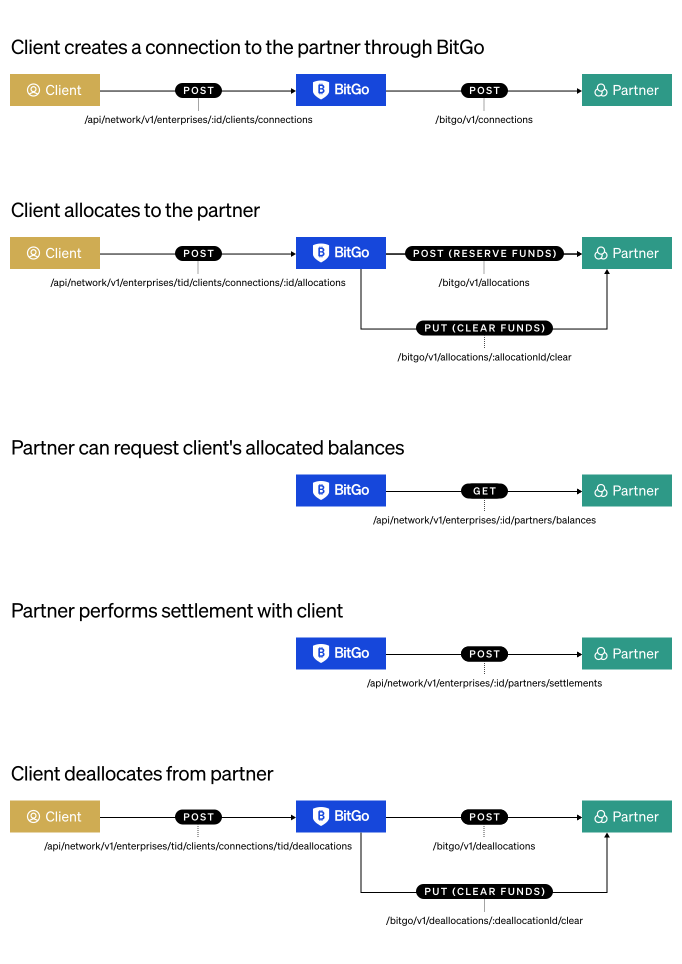
 As a client, you can use Off-Exchange Settlement to:
1. Store assets securely at BitGo Bank & Trust
2. [Connect](/docs/oes-client-connect) to partner platforms
3. [Allocate](/docs/oes-client-allocate) assets to partners for trading
4. [Deallocate](/docs/oes-client-deallocate) assets back to BitGo custody
5. [View](/docs/oes-client-view-details) allocation and connection details
6. [Dispute](/docs/oes-client-disputes) settlements when necessary
## Prerequisites
* [Get Started](/docs/get-started-intro) - Ensure your access token has the following permissions:
* `Settlement Network - Read`
* `Settlement Network - Write`
* [Deposit Assets](/docs/deposit-assets) - Fund your BitGo wallets with assets you want to trade
* Create an account on a partner platform that supports Off-Exchange Settlement
* Generate access credentials from your partner platform account
## How It Works
1. **Connect** - Establish a connection between your BitGo account and your account on a partner platform
2. **Allocate** - Move assets from BitGo custody to the partner platform for trading
3. **Trade** - Trade your allocated assets on the partner platform
4. **Deallocate** - Return assets from the partner platform back to BitGo custody
5. **Monitor** - View your allocation details and connection status at any time
## Getting Started
Follow these steps to begin using Off-Exchange Settlement:
1. [Connect to Partner](/docs/oes-client-connect)
2. [Allocate Assets](/docs/oes-client-allocate)
3. [View Details](/docs/oes-client-view-details)
As a client, you can use Off-Exchange Settlement to:
1. Store assets securely at BitGo Bank & Trust
2. [Connect](/docs/oes-client-connect) to partner platforms
3. [Allocate](/docs/oes-client-allocate) assets to partners for trading
4. [Deallocate](/docs/oes-client-deallocate) assets back to BitGo custody
5. [View](/docs/oes-client-view-details) allocation and connection details
6. [Dispute](/docs/oes-client-disputes) settlements when necessary
## Prerequisites
* [Get Started](/docs/get-started-intro) - Ensure your access token has the following permissions:
* `Settlement Network - Read`
* `Settlement Network - Write`
* [Deposit Assets](/docs/deposit-assets) - Fund your BitGo wallets with assets you want to trade
* Create an account on a partner platform that supports Off-Exchange Settlement
* Generate access credentials from your partner platform account
## How It Works
1. **Connect** - Establish a connection between your BitGo account and your account on a partner platform
2. **Allocate** - Move assets from BitGo custody to the partner platform for trading
3. **Trade** - Trade your allocated assets on the partner platform
4. **Deallocate** - Return assets from the partner platform back to BitGo custody
5. **Monitor** - View your allocation details and connection status at any time
## Getting Started
Follow these steps to begin using Off-Exchange Settlement:
1. [Connect to Partner](/docs/oes-client-connect)
2. [Allocate Assets](/docs/oes-client-allocate)
3. [View Details](/docs/oes-client-view-details)